Text-to-Speech (TTS) API Alternative: Self-Managed OpenVoice vs MetaVoice Comparison
A cost-effective alternative to Text-to-speech APIs In the realm of text-to-speech (TTS) technology, two open-source models have recently garnered everyone’s attention: OpenVoice and MetaVoice. Each model has unique capabilities in voice synthesis, but both were recently open sourced. We conducted benchmarks for both models on SaladCloud showing a world of efficiency and cost-effectiveness, highlighting the platform’s ability to democratize advanced voice synthesis technologies. The benchmarks focused on self-managed OpenVoice and MetaVoice as a far cheaper alternative to popular text to speech APIs. In this article, we will delve deeper into each of these models, exploring their distinctive features, capabilities, price, speed, quality, and how they can be used in real-world applications. Our goal is to provide a comprehensive understanding of these technologies, enabling you to make informed decisions about which model best suits your voice synthesis requirements. If you are serving TTS inference at scale, utilizing a self-managed, open-source model framework on a distributed cloud like SaladCloud is 50-90% cheaper compared to APIs. Efficiency and affordability of Salad’s distributed cloud Recently, we benchmarked OpenVoice and MetaVoice on SaladCloud’s global network of distributed GPUS. Tapping into thousands of latent consumer GPUs, SaladCloud’s GPU prices start from $0.02/hour. With more than 1 Million PCs on the network, SaladCloud’s distributed infrastructure provides the computational power needed to process large datasets swiftly, while its cost-efficient pricing model ensures that businesses can leverage these advanced technologies without breaking the bank. Running OpenVoice on SaladCloud comes out to be 300 times cheaper than Azure Text to Speech service. Similarly, MetaVoice on SaladCloud is 11X cheaper than AWS Polly Long Form. A common thread: Open Source Text-to-Speech innovation OpenVoice TTS, OpenVoice Cloning, and MetaVoice share a foundational principle: they are all open-source text-to-speech models. These models are not only free to use but also offer transparency in their development processes. Users can inspect the source code, contribute to improvements, and customize the models to fit their specific needs. With the source code, developers and researchers can customize and enhance these models to suit their specific needs, driving innovation in the TTS domain. A closer look at each model: OpenVoice and MetaVoice OpenVoice is an open-source, instant voice cloning technology that enables the creation of realistic and customizable speech from just a short audio clip of a reference speaker. Developed by MyShell.ai, OpenVoice stands out for its ability to replicate the voice’s tone color while offering extensive control over various speech attributes such as emotion and rhythm. OpenVoice voice replication process involvesseveral key steps that can be used both together or separately: OpenVoice Base TTS OpenVoice’s base Text-to-Speech (TTS) engine is a cornerstone of its framework, efficiently transforming written text into spoken words. This component is particularly valuable in scenarios where the primary goal is text-to-speech conversion without the need for specific voice toning or cloning. The ease with which this part of the model can be isolated and utilized independently makes it a versatile tool that is ideal for applications that demand straightforward speech synthesis. OpenVoice Benchmark: 6 Million+ words per $ on SaladCloud OpenVoice Cloning Building upon the base TTS engine, this feature adds a layer of sophistication by enabling the replication of a reference speaker’s unique vocal characteristics. This includes the extraction and embodiment of tone color, allowing for the creation of speech that not only sounds natural but also carries the emotional and rhythmic nuances of the original speaker. OpenVoice’s cloning capabilities extend to zero-shot cross-lingual voice cloning, a remarkable feature that allows for the generation of speech in languages not present in the training dataset. This opens up a world of possibilities for multilingual applications and global reach. MetaVoice-1B MetaVoice-1B is a robust 1.2 billion parameter base model trained on an extensive dataset of 100,000 hours of speech. Its design is focused on achieving natural-sounding speech with an emphasis on emotional rhythm and tone in English. A standout feature of MetaVoice 1B is its zero-shot cloning capability for American and British voices, requiring just 30 seconds of reference audio for effective replication. The model also supports cross-lingual voice cloning with fine-tuning, showing promising results with as little as one minute of training data for Indian speakers. MetaVoice-1B is engineered to capture the nuances of emotional speech, ensuring that the synthesized output resonates with listeners on a deeper level. MetaVoice Benchmark: 23,300 words per $ on SaladCloud Benchmark results: Price comparison of voice synthesis models on SaladCloud The following table presents the results of our benchmark tests, where we ran the models OpenVoice TTS, OpenVoice Cloning, and MetaVoice on SaladCloud GPUs. For consistency, we used the text from Isaac Asimov’s book “Robots and Empire”, available on Internet Archive: Digital Library of Free & Borrowable Books, Movies, Music & Wayback Machine , comprising approximately 150,000 words, and processed it through all compatible SaladCloud GPUs. Model Name Most Cost-EfficientGPU Words per Dollar Second Most CostEfficient GPU Words per Dollar OpenVoice TTS RTX 2070 6.6 Million GTX 1650 6.1 million OpenVoice Cloning GTX 1650 4.7 Million RTX 2070 4.02 million MetaVoice RTX 3080 23,300 RTX 3080 Ti 15,400 Table: Comparison of OpenVoice Text-to-Speech, OpenVoice Cloning and MetaVoice The benchmark results clearly indicate that OpenVoice, both in its TTS and Cloning variants, is significantly more cost-effective compared to MetaVoice. The OpenVoice TTS model, when run on an RTX 2070 GPU, achieves an impressive 6.6 Million words per dollar, making it the most efficient option among the tested models. The price of using RTX2070 on SaladCloud is $0.06/hour, which, together with the vCPU and RAM we used, got us to a total of $0.072/hour. OpenVoice Cloning also demonstrates strong cost efficiency, particularly when using the GTX 1650, which processes 4.7 Million words per dollar. This is a notable advantage for applications requiring less robotic voice. In contrast, MetaVoice’s performance on the RTX 3080 and RTX 3080 Ti GPUs yields significantly fewer words per dollar, indicating a higher cost for processing speech. However, don’t rush to dismiss MetaVoice just yet; upcoming comparisons may offer a different perspective that could
MetaVoice AI Text-to-Speech (TTS) Benchmark: Narrate 100,000 words for only $4.29 on SaladCloud

Note: Do not miss out on listening to voice clones of 10 different celebrities reading Harry Potter and the Sorcerer’s Stone towards the end of the blog. Introduction to MetaVoice-1B MetaVoice-1B is an advanced text-to-speech (TTS) model boasting 1.2 billion parameters, meticulously trained on a vast corpus of 100,000 hours of speech. Engineered with a focus on producing emotionally resonant English speech rhythms and tones, MetaVoice-1B stands out for its accuracy and realistic voice synthesis. One standout feature of MetaVoice-1B is its ability to perform zero shot voice cloning. This feature requires only a 30-second audio snippet to accurately replicate American & British voices. It also includes cross-lingual cloning capabilities demonstrated with as little as one minute of training data for Indian accents. A versatile tool released under the permissive Apache 2.0 license, MetaVoice-1B is designed for long-form synthesis. The architecture of MetaVoice-1B MetaVoice-1B’s architecture is a testament to its innovative design. Combining causal GPT structures and non-causal transformers, it predicts a series of hierarchical EnCodec tokens from text and speaker information. This intricate process includes condition-free sampling, enhancing the model’s cloning proficiency. The text is processed through a custom-trained BPE tokenizer, optimizing the model’s linguistic capabilities without the need for predicting semantic tokens, a step often deemed necessary in similar technologies. MetaVoice cloning benchmark methodology on SaladCloud GPUs Encountered Limitations and Adaptations During the evaluation, we encountered limitations with the maximum length of text that MetaVoice could process in one go. The default token limit is set to 2048 tokens per batch. However, we noticed that even with a smaller number of tokens, the model starts to act differently than expected. To solve the limit issue, we had to preprocess our data by dividing the text into smaller segments, specifically two-sentence pieces, to accommodate the model’s capabilities. To break the text into sentences, we used Punkt Sentence Tokenizer. The text source remained consistent with previous benchmarks, utilizing Isaac Asimov’s “Robots and Empire,” available from Internet Archive: Digital Library of Free & Borrowable Books, Movies, Music & Wayback Machine. For the voice cloning component, we utilized a one-minute sample of Benedict Cumberbatch’s narration. The synthesized output very closely mirrored the distinctive qualities of Cumberbatch’s narration, demonstrating MetaVoice’s cloning capabilities, which are the best we’ve seen yet. Here is a voice-cloning example featuring Benedict Cumberbatch: GPU Specifications and Selection MetaVoice documentation specifies the need for GPUs with VRAM of 12GB or more. Despite this, our trials included GPUs with lower VRAM, which still performed adequately. But this required a careful selection process from SaladCloud’s GPU fleet to ensure compatibility. We standardized each node with 1 vCPU and 8GB of RAM to maintain a consistent testing environment. Benchmarking Workflow The benchmarking procedure was incorporating multi-threaded operations to enhance efficiency. The process involved parallel downloading of parts of text and the voice reference sample from Azure and processing text through MetaVoice model. After completing the cycle, the resulting audio was uploaded back to Azure. This comprehensive workflow was designed to simulate a typical application scenario, providing a realistic assessment of MetaVoice’s operational performance on SaladCloud GPUs. Benchmark Findings: Cost-Performance and Inference Speed Words per Dollar Efficiency Our benchmarking results reveal that the RTX 3080 GPU leads in terms of cost-efficiency for MetaVoice, achieving an impressive 23,300 words per dollar. The RTX 3080 Ti follows closely with 15,400 words per dollar. These figures highlight the resource-intensive nature of MetaVoice, requiring powerful GPUs to operate efficiently. Speed Analysis and GPU Requirements Our speed analysis revealed that GPUs with 10GB or more VRAM performed consistently, processing approximately 0.8 to 1.2 words per second. In contrast, GPUs with lower VRAM demonstrated significantly reduced performance, rendering them unsuitable for running MetaVoice. This aligns with the developers’ recommendation of using GPUs with at least 12GB VRAM to ensure optimal functionality. Cost Analysis for an Average Book To provide a practical perspective, let’s consider the cost of converting an average book into speech using MetaVoice on SaladCloud GPUs. Assuming an average book contains approximately 100,000 words: Creating a narration of “Harry Potter and the Sorcerer’s Stone” by Benedict Cumberbatch would cost around $3.30 with an RTX 3080 and $5.00 with an RTX 3080 Ti. Here is an example of a voice clone of Benedict Cumberbatch reading Harry Potter: Notice that we did not change any model parameters or add business logic. We only added batch processing sentence by sentence. We also cloned other celebrity voices to read out the first page of Harry Potter and the Sorcerer’s Stone. Here’s a collection of different voice clones reading Harry Potter using MetaVoice. MetaVoice GPU Benchmark on SaladCloud – Conclusion In conclusion, the combination of MetaVoice and SaladCloud GPUs presents a cost-effective and high-quality solution for text-to-speech and voice cloning projects. Whether for large-scale audiobook production or specialized projects like celebrity-narrated books, this technology offers a new level of accessibility and affordability in voice synthesis. As we move forward, it will be exciting to see how these advancements continue to shape the landscape of digital content creation. SaladCloud suggests: If you are just looking to generate AI voices, give Veed.io’s AI voice generator a try. With AI voices and AI avatars, Veed.io will generate ultra-realistic text-to-speech audio/video for personal and commercial use. SaladCloudSaladCloud is the world’s largest distributed cloud computing network with 11,000+ daily GPUs and 450,000 GPUs contributing compute, all at the lowest cost in the market.
Parakeet TDT 1.1B Inference Benchmark on SaladCloud: 1,000,000 hours of transcription for Just $1260
Parakeet TDT 1.1B GPU benchmark The Automatic Speech Recognition (ASR) model, Parakeet TDT 1.1B, is the latest addition to NVIDIA’s Parakeet family. Parakeet TDT 1.1B boasts unparalleled accuracy and significantly faster performance compared to other models in the same family. Using our latest batch-processing framework, we conducted comprehensive tests with Parakeet TDT 1.1B against extensive datasets, including English CommonVoice and Spoken Wikipedia Corpus English(Part1, Part2). In this detailed GPU benchmark, we will delve into the design and construction of a high-throughput, reliable, and cost-effective batch-processing system within SaladCloud. Additionally, we will conduct a comparative analysis of the inference performance between Parakeet TDT 1.1B and other popular ASR models like Whisper Large V3 and Distil-Whisper Large V2. Advanced system architecture for batch jobs Our latest batch-processing framework consists of the following: HTTP handlers using AWS Lambda or Azure Functions can be implemented for both the Job Queue System and the Job Recording System. This provides convenient access, eliminating the necessity of installing a specific Cloud Provider’s SDK/CLIs within the application container image. We aimed to keep the framework components fully managed and serverless to closely simulate the experience of using managed transcription services. A decoupled architecture provides the flexibility to choose the best and most cost-effective solution for each component from the industry. Enhanced Node Implementation for High Performance and Throughout We have refined the node implementation to further enhance the system performance and throughput. Within each node in the GPU resource pool in SaladCloud, we follow best practices by utilizing two processes: 1) Inference Process The transcription for audio involves resource-intensive operations on both CPU and GPU, including format conversion, re-sampling, segmentation, transcription and merging. The more CPU operations involved, the lower the GPU utilization experienced. While having the capacity to fully leverage the CPU, multiprocessing or multithreading-based concurrent inference over a single GPU might limit optimal GPU cache utilization and impact performance. This is attributed to each inference running at its own layer or stage. The multiprocessing approach also consumes more VRAM as every process requires a CUDA context and loads its own model into GPU VRAM for inference. Following best practices, we delegate more CPU-bound pre-processing and post-processing tasks to the benchmark worker process. This allows the inference process to concentrate on GPU operations and run on a single thread. The process begins by loading the model, warming up the GPU, and then listens on a TCP port by running a Python/FastAPI app on a Unicorn server. Upon receiving a request, it invokes the transcription inference and promptly returns the generated assets. Batch inference can be employed to enhance performance by effectively leveraging GPU cache and parallel processing capabilities. However, it requires more VRAM and might delay the return of the result until every single sample in the input is processed. The choice of using batch inference and determining the optimal batch size depends on model, dataset, hardware characteristics and use case. This also requires experimentation and ongoing performance monitoring. 2) Benchmark Worker Process The benchmark worker process primarily handles various I/O- and CPU-bound tasks, such as downloading/uploading, pre-processing, and post-processing. The Global Interpreter Lock (GIL) in Python permits only one thread to execute Python code at a time within a process. While the GIL can impact the performance of multithreaded applications, certain operations remain unaffected, such as I/O operations and calling external programs. To maximize performance with better scalability, we adopt multiple threads to concurrently handle various tasks, with several queues created to facilitate information exchange among these threads. Thread Description Downloader In most cases, we require 2 to 3 threads to concurrently pull jobs and download audio files, and efficiently feed the inference pipeline while preventing the download of excessive audio files. The actual number depends on the characteristics of the application and dataset, as well as network performance. It also performs the following pre-processing steps:1) Removal of bad audio files.2) Format conversion and re-sampling.3) Chunking very long audio into 15-minute clips.4) Metadata extraction (URL, file/clid ID, length). The pre-processed audio files and their corresponding metadata JSON files are stored in a shared folder. Simultaneously, the filenames of the JSON files are added to the transcribing queue. Caller It reads a JSON filename from the transcribing queue, retrieves the metadata by reading the corresponding file in the shared folder, and subsequently sends a synchronous request, including the audio filename, to the inference server. Upon receiving the response, it forwards the generated texts along with statistics to the reporting queue, while simultaneously sending the transcribed audio and JSON filenames to the cleaning queue. The simplicity of the caller is crucial as it directly influences the inference performance. Reporter The reporter, upon reading the reporting queue, manages post-processing tasks, including merging results and format conversion. Eventually, it uploads the generated assets and reports the job results. Multiple threads may be required if the post-processing is resource-intensive. Cleaner After reading the cleaning queue, the cleaner deletes the processed audio files and their corresponding JSON files from the shared folder. By running two processes to segregate GPU-bound tasks from I/O and CPU-bound tasks, and fetching and preparing the next audio clips concurrently and in advance while the current one is still being transcribed, eliminates any waiting period. After one audio clip is completed, the next is immediately ready for transcription. This approach not only reduces the overall processing time for batch jobs but also leads to even more significant cost savings. Single-Node Test using JupyterLab on SaladCloud Before deploying the application container image on a large scale in SaladCloud, we can build a specialized application image with JupyterLab and conduct the single-node test across various types of Salad nodes. With JupyterLab’s terminal, we can log into a container instance running on SaladCloud and gain OS-level access. This enables us to conduct various tests and optimize the configurations and parameters of the model and application. These include: Analysis of single-node test using JupyterLab Based on our tests using JupyterLab, we found that the inference of Parakeet TDT 1.1B for audio
Inference Benchmark on SaladCloud: Distil-Whisper Large V2 vs. Whisper Large V3 for Speech-to-text
Hugging Face Distil-Whisper Large V2 is a distilled version of the OpenAI Whisper model that is 6 times faster, 49% smaller, and performs within 1% WER (word error rates) on out-of-distribution evaluation sets. However, it is currently only available for English speech recognition. Building upon the insights from the previous inference benchmark of Whisper Large V3, we have conducted tests with Distill-Whisper Large V2 by using the same batch-processing infrastructure, against the same English CommonVoice and Spoken Wikipedia Corpus English (Part1, Part2) datasets. Let’s explore the distinctions between these two automatic speech recognition models in terms of cost and performance, and see which one better fits your needs. Batch-Processing Framework We used the same batch processing framework to test the two models, consisting of: Advanced Batch-Processing Architecture for Massive Transcription We aimed to adopt a decoupled architecture that provides flexibility in choosing the best and most cost-effective solution for each component in the industry. Simultaneously, we strived to keep the framework components fully managed and serverless to closely simulate the experience of using managed transcription services. Furthermore, two processes are employed in each node to segregate GPU-bound tasks from I/O and CPU-bound tasks, and fetching the next audio clips earlier while the current one is still being transcribed, allows us to eliminate any waiting period. After one audio clip is completed, the next is immediately ready for transcription. This approach not only reduces the overall processing time for batch jobs but also leads to even more significant cost savings. We also offer a data exploration tool – Jupyter notebook, designed to assist in preparing and analyzing inference benchmarks for various recognition models running on SaladCloud. Discover our open-source code for a deeper dive: Implementation of Inference and Benchmark Worker Docker Images Data Exploration Tool Massive Transcription Tests for Whisper Large on SaladCloud: We launched two container groups on SaladCloud, with each one dedicated to one of the two models. Each group was configured with 100 replicas (2vCPU and 12 GB RAM with all GPU types with 8GB or more VRAM) in SaladCloud and ran for approximately 10 hours. Here is the comparison: 10-hour Transcription with 100 Replicas in SaladCloud Whisper Large V3 Distil-Whisper Large V2 Number of Transcribed Audio Files 2,364,838 3,846,559 Total Audio Length (s) 28,554,156 (8000 hours) 47,207,294 (13113 hours) Average Audio Length (s) 12 12 Cost on SaladCloud(GPU resource pool) Around $100100 Replicas (2vCPU,12GB RAM),20 GPU types actually used Around $100100 Replicas (2vCPU,12GB RAM), 22 GPU types actually used Cost on AWS and Cloudflare(Job queue/Recording system & cloud storage) Less than $10 Around $15 Most Cost-Effective GPU Type for transcribing long audio files exceeding 30 seconds RTX 3060 196 hours per dollar RTX 2080 Ti500 hours per dollar Most Cost-Effective GPU Type for transcribing short audio files lasting less than 30 seconds RTX 2080/3060/3060Ti/3070Ti47 hours per dollar RTX 2080/3060 Ti90 hours per dollar Best-performing GPU Type for transcribing short audio files lasting less than 30 seconds RTX 4080Average real-time factor: 40,transcribing 40 seconds of audio per second RTX 4090Average real-time factor: 93,transcribing 93 seconds of audio per second Best-Performing GPU Type for transcribing short audio files lasting less than 30 seconds RTX 3080Ti/4070Ti/4090Average real-time factor: 8,transcribing 8 seconds of audio per second RTX 4090Average real-time factor: 14,transcribing 14 seconds of audio per second System Throughput Transcribing 793 seconds of audio per second Transcribing 1311 seconds of audio per second Performance evaluation of the two Whisper Large models Different from those obtained in local tests with a few machines in a LAN, all these numbers are achieved in a global and distributed cloud environment that provides transcription at a large scale, including the entire process from receiving requests to transcribing and sending the responses. Evidently, Distill-Whisper Large V2 outperforms Whisper Large V3 in both cost and performance. With a model size half that of Whisper, Distill-Whisper can run faster and allow for the utilization of a broader range of GPU types. This significant reduction in cost and improvement in performance are noteworthy outcomes. If the requirement is mainly for English speech recognition, Distill-Whisper is recommended. While Distil-Whisper boasts a six-fold increase in speed compared to Whisper, the real-world tests indicate that its system throughput is only 165% of that of Whisper. Similar to a car, its top speed depends on factors such as the engine, gears, chassis, and tires. Simply upgrading the engine to one that is 200% more powerful doesn’t assure a doubling of the maximum speed. In a global and distributed cloud environment offering services at a large scale, various factors can impact overall performance, including distance, transmission and processing delays, model size, and performance, among others. Hence, a comprehensive approach is essential for system design and implementation, encompassing use cases, business goals, resource configuration, and algorithms, among other considerations. Performance Comparison across Different Clouds Thanks to the open-source speech recognition model, Whisper Large V3, and the advanced batch-processing architecture harnessing hundreds of consumer GPUs on SaladCloud, we have already achieved a remarkable 500-fold cost reduction while retaining the same level of accuracy as other public cloud providers: $1 dollar can transcribe 11,736 minutes of audio (nearly 200 hours) with the most cost-effective GPU type. Distil-Whisper Large V2 propels us even further, delivering an incredible 1000-fold cost reduction for English speech recognition compared to managed transcription services. This equates to $1 transcribing 29,994 minutes of audio, or nearly 500 hours. We believe these will fundamentally transform the speech recognition industry. SaladCloud: The Most Affordable GPU Cloud for Massive Audio Transcription For voice AI companies in pursuit of cost-effective and robust GPU solutions at scale, SaladCloud emerges as a game-changing solution. Boasting the market’s most competitive GPU prices, it tackles the issues of soaring cloud expenses and constrained GPU availability. In an era where cost-efficiency and performance take precedence, choosing the right tools and architecture can be transformative. Our recent Inference Benchmark of Whisper Large V3 and Distil-Whisper Large V2 exemplifies the savings and efficiency that can be achieved through innovative approaches. We encourage developers and startups to
OpenVoice Text-to-Speech (TTS) Benchmark: 6 Million+ Words/$ Using SaladCloud
What is OpenVoice? OpenVoice is an open-source, instant voice cloning technology that enables the creation of realistic and customizable speech from just a short audio clip of a reference speaker. Developed by MyShell.ai, OpenVoice stands out for its ability to precisely replicate the voice’s tone color while offering extensive control over various speech attributes such as emotion and rhythm. Remarkably, it also supports zero-shot cross-lingual voice cloning, enabling the generation of speech in languages not originally included in its extensive training set. OpenVoice is not only versatile but also exceptionally efficient, requiring significantly lower computational resources compared to commercially available text-to-speech (TTS) APIs, often at a fraction of the cost and with superior performance. For developers and organizations interested in exploring or integrating OpenVoice, the technical report and source code are available at arXiv and GitHub. The OpenVoice framework: An overview The OpenVoice technology encompasses a sophisticated framework designed to replicate human speech with remarkable accuracy and versatility. The process involves several key steps, each contributing to the creation of natural-sounding and personalized voice output. Here’s a closer look at the OpenVoice framework: Here is an illustration from the official technical report. Methodology of the OpenVoice Text-to-Speech (TTS) benchmark on SaladCloud GPUs For this initial benchmark, we have focused exclusively on the Text-to-Speech (TTS) component of OpenVoice, setting the stage for a more comprehensive analysis that will include full TTS and voice cloning in a future benchmark. Utilizing the default voice parameters with a speed setting of 1, our base text was the book “Robots and Empire” by Isaac Asimov, available via Archive.org, totaling approximately 150,000 words. To manage memory efficiency and ensure seamless processing, we broke down and processed the text into chunks of roughly 30 sentences, or 200-300 words. Our evaluation spanned all consumer GPU classes available on SaladCloud, with each node provisioned with 1 vCPU and 8GB of RAM. To simulate a single-task environment typical of many production systems, we did not employ threading. Thus, each GPU was tasked with processing one chunk of text at a time. This setup provides insight into the raw processing power of each GPU class without the performance enhancements of parallel processing. The workflow involved downloading the text from Azure, processing it through the TTS component of OpenVoice, and then uploading the resulting audio back to Azure. This end-to-end process allowed us to assess not only the computational performance of each GPU but also the impact of network bandwidth and data transfer efficiencies. Benchmark findings: Cost-performance and inference speed Words per dollar efficiency For our first analysis, we only tracked GPU processing time without considering text download and audio upload time. The first plot revealed a clear leader in terms of cost-efficiency: the RTX 2070 GPU, which processed an impressive 6.6 million words per dollar, excluding the time for text download and audio upload. This metric is crucial for organizations that need to optimize their operating costs without compromising on output volume. The price of using RTX2070 on SaladCloud is $0.06/hour, which, together with the vCPU and RAM we used, got us to a total of $0.072/hour. Average words per second In terms of raw speed, the second plot shows that the RTX 3080 Ti topped the charts, achieving around 230.4 words per second. While the RTX 2070 lagged behind at approximately 132.7 words per second, its lower operational cost of $0.06 per hour compared to the RTX 3080 Ti’s $0.20 per hour makes it an attractive option for cost-conscious deployments. If you are interested in processing your text faster, RTX3080+ will be the best choice. Words per dollar, including data transfer times The third plot introduced the reality of data transfer times, showcasing how the words-per-dollar metric shifts when including the time to download and upload data to and from Azure. In this scenario, the RTX 2070 remained efficient, processing 4.53 million words per dollar. This efficiency hints at further potential savings if data transfers are optimized, such as by processing data in parallel with downloads/uploads, which we did not include in our process. The Potential of Multithreading While this benchmark focused on single-threaded operations, it’s worth noting that the capacity for multithreading on more powerful GPUs like the RTX 3080 Ti could narrow the cost-performance gap. By processing multiple text chunks simultaneously, these GPUs could deliver even more words per dollar, adding a layer of strategic decision-making for organizations balancing speed and cost. Conclusion: Insights for TTS Deployment and Azure Comparison Through our benchmarking of the OpenVoice TTS component on SaladCloud GPUs, we have identified the following: To put these findings in perspective, let’s compare them with the pricing structure of Azure’s Speech Services. Azure Speech Services offers various tiers and features in its pricing model. For standard text-to-speech (TTS) services, the price is $1 per hour for real-time processing and $0.36 per hour for batch processing. This pricing can increase with custom models and endpoint hosting, reaching up to $1.20 per hour plus additional costs for model hosting. There is also a per character pricing option in Azure which is $15 per 1 million characters for real-time and batch synthesis. In contrast, our benchmark with OpenVoice on SaladCloud GPUs has demonstrated that the RTX 2070 can process an impressive 6.6 million words per dollar, excluding network transfer times. Even when including the time for text download and audio upload, the RTX 2070 achieves 4.53 million words per dollar. Given that the average English word is around 5 characters long, this means that, for the cost of processing 1 million characters on Azure, you could potentially process up to 300+ million characters using OpenVoice on SaladCloud GPUs. Therefore, when considering factors such as budget constraints and processing speed requirements, OpenVoice on SaladCloud GPUs emerges as a compelling alternative to managed services like Azure Speech Services. It offers not just a cost advantage but also the potential for greater customization and scalability – a powerful combination for businesses and developers looking to integrate advanced voice synthesis capabilities into their
Whisper Large V3 Speech Recognition Benchmark: 1 Million hours of audio transcription for just $5110
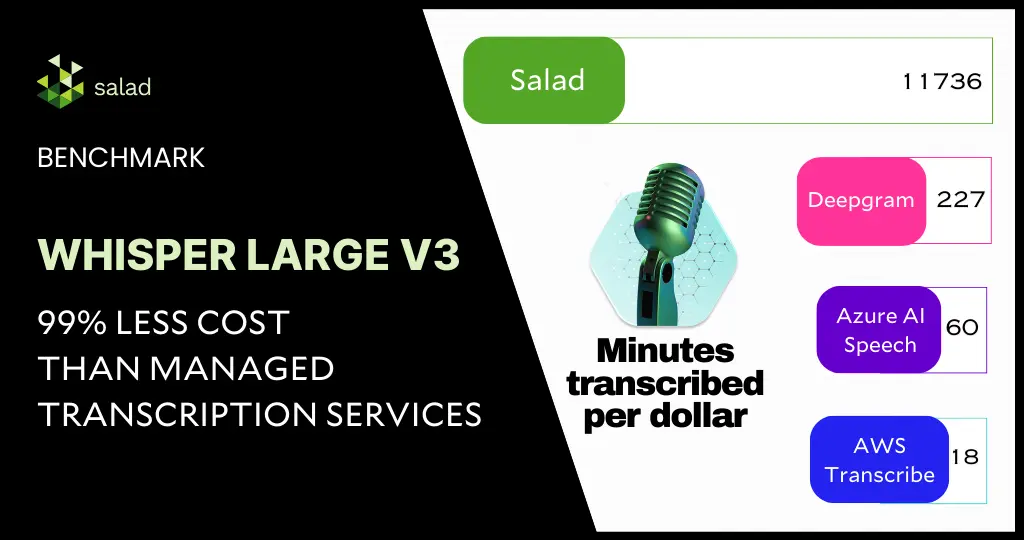
Save over 99.8% on audio transcription using Whisper Large V3 and consumer GPUs A 99.8% cost-savings for automatic speech recognition sounds unreal. However, with the right choice of GPUs and models, this is very much possible and highlights the needless overspending on managed transcription services today. In this deep dive, we will benchmark the latest Whisper Large V3 model from Open AI for inference against the extensive English CommonVoice and Spoken Wikipedia Corpus English (Part1, Part2) datasets, delving into how we accomplished an exceptional 99.8% cost reduction compared to other public cloud providers. Building upon the inference benchmark of Whisper Large V2 and with our continued effort to enhance the system architecture and implementation for batch jobs, we have achieved substantial reductions in both audio transcription costs and time while maintaining the same level of accuracy as the managed transcription services. Behind The Scenes: Advanced System Architecture for Batch Jobs Our batch-processing framework comprises the following: We aimed to keep the framework components fully managed and serverless to closely simulate the experience of using managed transcription services. A decoupled architecture provides the flexibility to choose the best and most cost-effective solution for each component from the industry. Within each node in the GPU resource pool in SaladCloud, two processes are utilized following best practices: one dedicated to GPU inference and another focused on I/O and CPU-bound tasks, such as downloading/uploading, preprocessing, and post-processing. 1) Inference Process The inference process operates on a single thread. It begins by loading the Whisper Large V3 model, warming up the GPU, and then listens on a TCP port by running a Python/FastAPI app in a Unicorn server. Upon receiving a request, it calls the transcription inference and returns the generated assets. The chunking algorithm is configured for batch processing, where long audio files are segmented into 30-second clips, and these clips are simultaneously fed into the model. The batch inference significantly enhances performance by effectively leveraging the GPU cache and parallel processing capabilities. 2) Benchmark Worker Process The benchmark worker process primarily handles various I/O tasks, as well as pre-and post-processing. Multiple threads are concurrently performing various tasks: one thread pulls jobs and downloads audio clips; another thread calls the inference, while the remaining threads manage tasks such as uploading generated assets, reporting job results and cleaning the environment, etc. Several queues are created to facilitate information exchange among these threads. Running two processes to segregate GPU-bound tasks from I/O and CPU-bound tasks and fetching the next audio clips earlier while the current one is still being transcribed allows us to eliminate any waiting period. After one audio clip is completed, the next is immediately ready for transcription. This approach not only reduces the overall processing time for batch jobs but also leads to even more significant cost savings. Deployment on SaladCloud We created a container group with 100 replicas (2 vCPU and 12 GB RAM with 20 different GPU types) in SaladCloud, and ran it for approximately 10 hours. In this period, we successfully transcribed over 2 million audio files, totalling nearly 8000 hours in length. The test incurred around $100 in SaladCloud costs and less than $10 on both AWS and Cloudflare. Results from the Whisper Large v3 benchmark Among the 20 GPU types, based on the current datasets, the RTX 3060 stands out as the most cost-effective GPU type for long audio files exceeding 30 seconds. Priced at $0.10 per hour on SaladCloud, it can transcribe nearly 200 hours of audio per dollar. For short audio files lasting less than 30 seconds, several GPU types exhibit similar performance, transcribing approximately 47 hours of audio per dollar. On the other hand, the RTX 4080 outperforms others as the best-performing GPU type for long audio files exceeding 30 seconds, boasting an average real-time factor of 40. This implies that the system can transcribe 40 seconds of audio per second. For short audio files lasting less than 30 seconds, the best average real-time factor is approximately 8 by a couple of GPU types, indicating the ability to transcribe 8 seconds of audio in just 1 second. Analysis of the benchmark results Different from those obtained in local tests with several machines in a LAN, all these numbers are achieved in a global and distributed cloud environment that provides transcription at a large scale, including the entire process from receiving requests to transcribing and sending the responses. There are various methods to optimize the results. Aiming for reduced costs, improved performance or even both, and different approaches may yield distinct outcomes. The Whisper models come in five configurations of varying model sizes: tiny, base, small, medium, and large(v1/v2/v3). The large versions are multilingual and offer better accuracy, but they demand more powerful GPUs and run relatively slowly. On the other hand, the smaller versions support only English with slightly lower accuracy, but it requires less powerful GPUs and runs very fast. Choosing more cost-effective GPU types in the resource pool will result in additional cost savings. If performance is the priority, selecting higher-performing GPU types is advisable, while still remaining significantly less expensive than managed transcription services. Additionally, audio length plays a crucial role in both performance and cost, and it’s essential to optimize the resource configuration based on your specific use cases and business goals. Discover our open-source code for a deeper dive: Implementation of Inference and Benchmark Worker Docker Images Data Exploration Tool Performance Comparison across Different Clouds The results indicate that AI transcription companies are massively overpaying for the cloud today. With the open-source automatic speech recognition model – Whisper Large V3, and the advanced batch-processing architecture leveraging hundreds of consumer GPUs on SaladCloud, we can deliver transcription services at a massive scale and at an exceptionally low cost while maintaining the same level of accuracy as managed transcription services. With the most cost-effective GPU type for Whisper Large V3 inference on SaladCloud, $1 dollar can transcribe 11,736 minutes of audio (nearly 200 hours), showcasing a 500-fold cost reduction compared to other
Tutorial: How to run your own GPU-accelerated JupyterLab on SaladCloud
In recent times, JupyterLab has gained popularity among data scientists and students because of its ease of use, flexibility, and extensibility. However, access to resources and cost remain a hindrance. In this blog, we provide a walkthrough on creating and running your own GPU-accelerated JupyterLab, taking advantage of low GPU prices on SaladCloud. The challenge in data science learning & research Many college students and professionals in the AI and Data Science industry face common challenges when dealing with GPU-capable development environments for learning, testing, or researching. The laptops they use daily often lack a dedicated GPU, or the built-in GPUs are incompatible with popular frameworks like TensorFlow and PyTorch. Investing in a second computer with an NVIDIA GPU for Machine Learning not only costs thousands of dollars but also results in low utilization and inconvenience. In addition, building development environments using NVIDIA GPUs could be tedious work. One needs to be familiar with Windows, Linux, or both; understand the version compatibility among different software pieces; and know how to install Python and its IDE, TensorFlow/PyTorch, C/C++ Compiler, cuDNN, CUD, and the GPU Driver, etc. The process can be frustrating and time-consuming. Many individuals spend several days reading instructions and seeking help online, hindering research and learning progress. While public cloud providers offer options with GPU-capable compute instances or managed services, these solutions work well for enterprise customers training and deploying large AI models in production environments. However, they are too expensive and overkill for personal learning or testing, with prices ranging from $0.50 to tens of dollars per hour. Moreover, the services from these public cloud providers are becoming more and more complicated, and many services are intertwined and built on top of others. To start working on AI and Data Science using these public clouds, you likely need several weeks first to gain a basic understanding of how these services work together. The JupyterLab solution This is where a tool like JupyterLab is becoming increasingly popular as the standard for learning & researching in data science. JupyterLab is a web-based interactive development environment for notebooks, code, and data. It is designed to provide a flexible and powerful platform for data science, scientific computing, and computational workflows. JupyterLab is the next generation of Jupyter Notebook, which is one of the most popular IDEs for data science. It offers more features, flexibility, and integration than the classic Jupyter Notebook. But accessing and running JupyterLab on public clouds still requires significant time and financial commitment. Easy, affordable access to JupyterLab on SaladCloud SaladCloud is the world’s largest community-powered cloud, connecting unused compute resources with GPU-hungry businesses. By running JupyterLab on a distributed cloud infrastructure like SaladCloud, you can now learn data science at a more affordable cost. With more than a million individuals sharing compute and 10,000+ GPUs available at any time, SaladCloud offers consumer-grade GPUs at the lowest market prices compared to any other cloud. Prices start from $0.02/hour. You can view the complete list of GPU prices here. SaladCloud is very straightforward and easy to use: with pre-built container images, you can swiftly launch publicly-accessible, elastic and GPU-accelerated container applications within a few minutes. By building and running JupyterLab container images with popular AI/ML frameworks, we can transform SaladCloud into an ideal platform for college students and professionals to: Cost analysis of running JupyterLab on SaladCloud Here are the typical use cases running JupyterLab on SaladCloud and a cost analysis for each: Resource Type Use Cases Public Cloud Providers SaladCloud 2vCPU, 4 GB RAM,GPU with 4 GB VRAM Learning programming with Shell, C/C++, CUDA, PyTorch/TensorFlow, and Hugging Face. N/A $0.032 per hour 4vCPU, 16 GB RAMGPU with 16 GB VRAM Most NLP and CV tasks including testing, training and inference. $0.5+ per hour,Additional charge onnetwork traffic. $0.31 per hour,40% Saving 8vCPU, 24 GB RAMGPU with 24 GB VRAM Testing, fine-tuning and inference for the latest LLM and Stable Diffusion, etc. $1.2+ per hour,Additional charge onnetwork traffic. $0.36 per hour,70% Saving Cost comparison of SaladCloud & public cloud providers for different JupyterLab use cases Several JupyterLab container images have been built to meet general AI/ML requirements. The corresponding Dockerfiles are also available on the GitHub repository, allowing SaladCloud users to tailor these images to specific needs. Resources: How to deploy JupyterLab on SaladCloud SaladCloud is designed to execute stateless container workloads. To preserve code and data while using JupyterLab, it is imperative to set up the cloud-based storage and integrate it with the JupyterLab containers. We have already integrated the major public cloud platforms, including AWS, Azure, and GCP, into the pre-built container images. There are also detailed instructions on how to provision storage services on these platforms. With these integrations, the JupyterLab instances running on SaladCloud support data persistence, ensuring that changes in code and data are automatically saved to the cloud. For more information on how these images are built and integrated with public cloud providers, please refer to the user guide. Deploy the JupyterLab instance Let’s run a JupyerLab container instance on SaladCloud to see what it looks like. In this instance, we utilize AWS S3 as the backend storage. The AWS S3 bucket/folder has already been provisioned, and the access key ID and secret access key have been generated. This step can be omitted if data persistence in the container is not necessary. Log in to the SaladCloud Console and deploy the JupyterLab instance by selecting ‘Deploy a Container Group’ with the following parameters: Parameter Value Container Group Name jupyterlab001 Image Source saladtechnologies/jupyterlab:1.0.0-pytorch-tensorflow-cpu-aws-azure-gcp Replica Count 1 vCPU 2 Memory 4 GB GPU RTX 1650 (4 GB), RTX 2080 (8 GB), RTX 4070 (12 GB)# We can choose multiple GPU types simultaneously, and SaladCloud will then select a node that matches one of the selected types. Networking Enable, Port: 8000Use Authentication: No Environment Variables JUPYTERLAB_PWAWS_ACCESS_KEY_IDAWS_SECRET_ACCESS_KEYAWS_S3_BUCKET_FOLDER Setup the environment variables The default password for JupyterLab will be ‘data’ if we don’t provide the environment variable – ‘JUPYERLAB_PW’, and the other 3 AWS-related environment variables can be omitted if
Your own ChatGPT for just $0.04/hr – with Ollama, ChatUI and SaladCloud
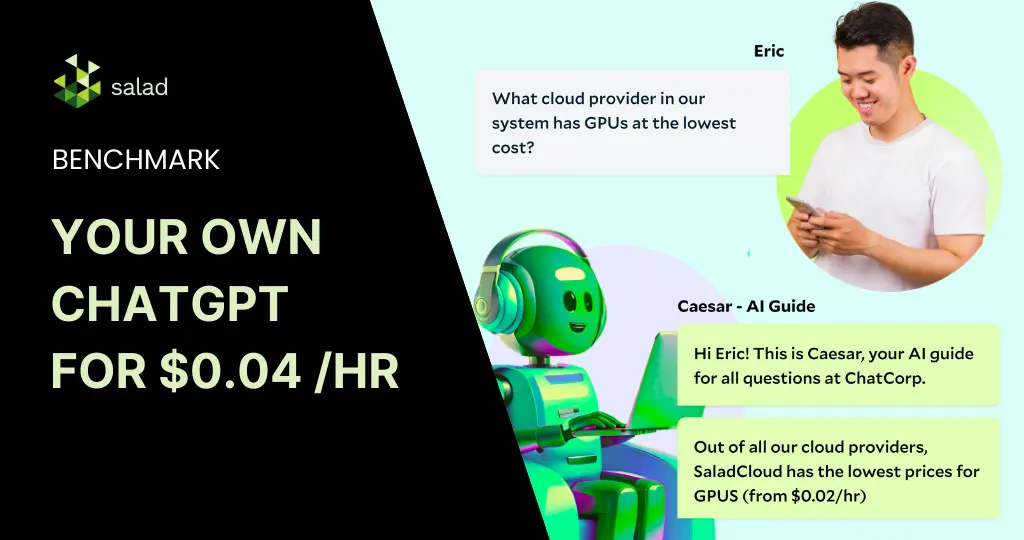
Deploy your own LLM with Ollama & Huggingface Chat UI on SaladCloud How much does it cost to build and deploy a ChatGPT-like product today? The cost could be anywhere from thousands to millions – depending on the model, infrastructure, and use case. Even the same task could cost anywhere from $1000 to $100,000. But with the advancement of open-source models & open infrastructure, there’s been tremendous interest in building a cost-efficient ChatGPT-like tool for various real-life applications. In this article, we explore how tools like Ollama and Huggingface Chat UI can simplify this process, particularly when deployed on Salad’s distributed cloud infrastructure. The challenges in hosting & implementing LLMs In today’s digital ecosystem, Large Language Models (LLMs) have revolutionized various sectors, including technology, healthcare, education, and customer service. Their ability to understand and generate human-like text has made them immensely popular, driving innovations in chatbots, content creation, and more. These models, with their vast knowledge bases and sophisticated algorithms, can converse, comprehend complex topics, write code, and even compose poetry. This makes them highly versatile tools for many enterprise & everyday use cases. However, hosting and implementing these LLMs poses significant challenges. Despite these challenges, the integration of LLMs into platforms continues to grow, driven by their vast potential and the continuous advancements in the field. As solutions like Hugging Face’s Chat UIand SaladCloud continue to offer more accessible and efficient ways to deploy these models, we’re likely to see an even greater adoption and innovation across industries. What is Ollama? Ollama is a tool that enables the local execution of open-source large language models like Llama 2 and Mistral 7B on various operating systems, including Mac OS, Linux, and soon Windows. It simplifies the process of running LLMs by allowing users to execute models with a simple terminal command or an API call. Ollama optimizes setup and configuration, specifically tailoring GPU usage for efficient performance. It supports a variety of models and variants, all accessible through the Ollama model library, making it a versatile and user-friendly solution for running powerful language models locally. Here is a list of supported models: Model Parameters Size Download Llama2 7B 3.8GB ollama run llama2 Mistral 7B 4.1GB ollama run mistral Dolphin Phi 2.7B 1.6GB ollama run dolphin-phi Phi-2 2.7B 1.7GB ollama run phi Neural Chat 7B 4.1GB ollama run neural-chat Starling 7B 4.1GB ollama run starling-lm Code Llama 7B 3.8GB ollama run codellama Llama 2 Uncensored 7B 3.8GB ollama run llama2-uncensored Llama 2 13B 13B 7.3GB ollama run llama2:13b Llama 2 70B 70B 39GB ollama run llama2:70b Orca Mini 3B 1.9GB ollama run orca-mini Vicuna 7B 3.8GB ollama run vicuna LLaVA 7B 4.5GB ollama run llava What is Huggingface Chat UI? Huggingface Chat UI is a powerful tool for practitioners in the Large Language Model (LLM) space looking to deploy a ChatGPT-like conversational interface. It enables interaction with models hostedon Huggingface, leveraging its text generation inference or any custom API powered by LLM. Chat UI has such capabilities as conversational history, memory, authentication, and theming. Huggingface Chat UI is an ideal choice for those looking to create a more engaging and robust conversational agent. Integrating Ollama and Huggingface Chat UI for deploying on SaladCloud The main goal of our project is to integrate Ollama with Huggingface Chat UI and deploy them to SaladCloud.The final version of the code can be found here: GitHub – SaladTechnologies/ollama-chatui In order to achieve our goal, we did the following: 1. Clone Ollama Repository We start by cloning the Ollama repository from Ollama Git Repo. This repository serves as the base of the project.Ollama is a user-friendly tool and can be operated via terminal or as a REST API. In this project, the intention is to run Ollama in a Docker container and connect it to Chat UI. The Dockerfile from Ollama repository shows that it runs on host 0.0.0.0 and port 11434. However, since direct access to Ollama isn’t required but rather through the UI, this configuration will be modified later. 2. Setting Up Huggingface Chat UI Chat UI git repo: GitHub – huggingface/chat-ui: Open source codebase powering the HuggingChat app From the Chat UI Readme, we can see that we need to follow a few steps to make it work in our custom solution: Notice that the path to ollama is specified as http://127.0.0.1:11434. 3. Connecting Ollama and Chat UI We now need to connect Ollama and ChatUI. This involves ensuring that the Chat UI can communicate with the Ollama instance, typically by setting the appropriate port and host settings in the UI configuration to match the Ollama Docker deployment. First we clone the ChatUI repo in our Dockerfile and replace the host that Ollama uses with 127.0.0.1. Next expose port 3000 that is used by ChatUi.We will also replace the entry point with our custom shell script: With this script, we establish the necessary .env.local file and populate it with configurations. Next, we initiate the Ollama server in a separate tmux session to download the desired model. ChatUI is then activated on port 3000. For any adjustments in model settings, refer to the models_config/model.local file. We have also converted the MongoDB URL, Huggingface Token, and Model name into environment variables to facilitate seamless alterations during deployment to SaladCloud. Additionally, a DOWNLOAD_TIME variable is defined. Since Ollama runs in a tmux session, subsequent commands can be executed even if the server isn’t fully operational. To ensure that Ollama is fully active before initiating ChatUI, we incorporate a sleep duration. This duration is model-dependent forinstance, downloading llama2 might take around 8 minutes. 4. Deploying to SaladCloud After setting up and connecting Ollama and Chat UI, the complete system is ready for deployment to Salad’s cloud infrastructure. The integrated solution will be hosted on Salad’s robust cloud platform. Detailed deployment instructions and necessary files are accessible through the Salad Technologies Ollama Chat UI GitHub repository or by pulling the image from the Salad Docker Registry: saladtechnologies/ollama-chatui-salad:1.0.0. To deploy our solution, we need to follow the instructions:
LLM Comparison Through TGI Benchmark Using SaladCloud
In the field of Artificial Intelligence (AI), Text Generation Inference (TGI) has become a vital toolkit for deploying and serving Large Language Models (LLMs). TGI enables efficient and scalable text generation with popular open-source LLMs, including Llama, Falcon, StarCoder, BLOOM, GPT-NeoX, and Mistral. This SaladCloud benchmark dives deep into this technology, with a LLM comparison focused on the performance of popular language models. TGI and Large Language Models TGI is essential for leveraging the capabilities of Large Language Models, which are key to many AI applications today. These models, known for generating text that closely resembles human writing, are crucial for applications ranging from automated customer service to creative content generation.You can easily deploy TGI on SaladCloud using the following instructions: Run TGI (Text Generation Interface) by Hugging Face Experiment design: Benchmarking on SaladCloud Our benchmark study on SaladCloud aims to evaluate and compare select LLMs deployed through TGI. This will provide insights into model performance under varying loads and the efficacy of SaladCloud in supporting advanced AI tasks. Models for comparison We’ve selected the following models for our benchmark, each with its unique capabilities: Test parameters Batch Sizes: The models will be tested with batch sizes of 1, 4, 8, 16, 32, 64, and 128.Hardware Configuration: Uniform hardware setup across tests with 8 vCPUs, 28GB of RAM, and a 24GB GPU card.Benchmarking Tool: To conduct this benchmark, we utilized the Text Generation Benchmark Tool,which is a part of TGI and designed to effectively measure the performance of these models.Model Parameters: We’ve used the default Sequence length of 10 and decode length of 8. Performance metrics The TGI benchmark provides us with the following metrics for each batch we provided: Bigcode/santacoder bigcode/santacoder is part of the SantaCoder series, featuring 1.1 billion parameters and trained on subsets of Python, Java, and JavaScript from The Stack (v1.1). This model, known for its Multi Query Attention and a 2048-token context window, utilizes advanced training techniques like near-deduplication and comment-to-code ratio filtering. The SantaCoder series also includes variations in architecture and objectives, providing diverse capabilities in code generation and analysis. This is the smallest model in our benchmark. Key observations Cost-effectiveness on SaladCloud: bigcode/santacoder A key part of our analysis focused on the cost-effectiveness of running TGI models on SaladCloud. For a batch size of 32, with a compute cost of $0.35 per hour, we calculated the cost per million tokens based on throughput : The cost per token, considering the throughput and compute price, is approximately $0.03047 or about 3.047 cents per million tokens for output and $0.07572 per million input tokens. Tiiuae/falcon-7b Falcon-7B is a decoder-only model with 7 billion parameters. It was built by TII and trained on an extensive 1,500B token dataset from RefinedWeb, enhanced with curated corpora. It is available under the Apache 2.0 license, making it a significant model for large-scale text generation tasks. Key findings Cost-effectiveness on SaladCloud: Tiiuae/Falcon-7b For the tiiuae/falcon-7b model on SaladCloud with a batch size of 32 and a compute cost of $0.35 per hour, the calculated cost per million tokens with a throughput of 744 tokens per second is approximately $0.13095, or about 13.095 cents per million output tokens and $0.28345 per million input tokens. The average decode total latency for batch size 32 is 300.82 milliseconds. While this latency might be slightly higher compared to smaller models, it still falls within a reasonable range for many applications, especially considering the model’s large size of 7 billion parameters. The cost-effectiveness, combined with the model’s capabilities, makes it a viable option for extensive text generation tasks on SaladCloud. Code Llama Code Llama is a collection of generative text models, with the base model boasting 7 billion parameters. It’s part of a series ranging up to 34 billion parameters, specifically tailored for code-related tasks. This benchmark focuses on the base 7B version in Hugging Face Transformers format, designed to handle a wide range of coding applications. The cost for processing one million tokens using the Code Llama model on SaladCloud, with a batch size of 32 and a compute cost of $0.35 per hour, is approximately $0.11826 per million output tokens and $0.28679 per million input tokens. This figure highlights the economic feasibility of utilizing SaladCloud for large-scale text generation tasks with sophisticated models like Code Llama. Mistral-7B-Instruct-v0.1 Mistral-7B-Instruct-v0.1 is an instruct fine-tuned version of the Mistral-7B-v0.1 generative text model. This model leverages a variety of publicly available conversation datasets to enhance its capability to understand and generate human-like, conversational text. Its fine-tuning makes it particularly adept at handling instruction-based queries, setting it apart in the realm of LLMs. Key insights Implications and Cost Analysis The performance of the Mistral-7B-Instruct-v0.1 model on SaladCloud shows promising potential for its use in various AI-driven conversational systems. Its ability to process a high number of tokens per second at a manageable latency makes it a strong contender for applications requiring nuanced language understanding and generation. With a price of $0.35 per hour, we achieve a cost of approximately $0.12153 per million output tokens and $0.27778 per million input tokens. Conclusion – LLM comparison benchmark results Our comprehensive LLM comparison benchmark of various Text Generation Inference (TGI) models on SaladCloud reveals an insightful trend: despite the diversity in the models’ capabilities and complexities, there is a remarkable consistency in cost-effectiveness when using the same compute configuration. Consistent performance and cost-effectiveness Customizable compute options Final thoughts In conclusion, SaladCloud emerges as a compelling choice for deploying and running TGI models. Its ability to provide uniform compute efficiency across a range of models, combined with the option to customize and optimize compute resources, offers both consistency in performance and flexibility in cost management. Whether it’s for large-scale commercial deployments or smaller, more targeted AI tasks, SaladCloud’s platform is well-equipped to meet diverse text generation requirements with an optimal balance of efficiency and cost-effectiveness SaladCloudSaladCloud is the world’s largest distributed cloud computing network with 11,000+ daily GPUs and 450,000 GPUs contributing compute, all at the lowest cost in the market.
Data Pipeline Processing with GPUs: Why, How, and Where
You can’t train foundational AI models without good data, and lots of it. Data pipeline processing is a crucial task for any team that is building or even fine-tuning its own models. It involves loading, transforming, and analyzing large amounts of data from various sources, such as images, text, audio, video, logs, sensors, and more. Data pipeline processing can be used for tasks such as data cleaning, noise reduction, feature extraction, data augmentation, data validation, and dataset restructuring. However, data pipeline processing can also be very challenging, especially when dealing with massive volumes of data and complex computations. If not done properly, the result is a slow, expensive, and inefficient process. This is where GPU clouds come in handy. Why data pipeline processing should be done on GPUs GPUs can perform many operations simultaneously, which makes them more efficient than CPUs for certain types of tasks. GPUs are especially good at handling data-intensive and compute-intensive tasks, such as image processing, video processing, and machine learning. The benefits of using GPUs for this task are many: – GPUs speed up data pipeline processing by orders of magnitude compared to CPUs. For example, Google Cloud reported that using GPUs to accelerate data pipeline processing with Dataflow resulted in an order-of-magnitude reduction in CPU and memory usage. – GPUs reduce the cost of data pipeline processing by using less resources and power, compared to CPUs. For example, NVIDIA reported up to 50x faster performance and up to 90% lower cost to accelerate genomic workflows using GPUs compared to CPUs. – GPUs simplify data pipeline processing by enabling users to perform data transformations and machine learning tasks in the same pipeline without switching between different platforms or tools. For example, Cloud to Street, a company that uses satellites and AI to track floods, reported that using GPUs to perform image processing and machine learning tasks in Dataflow pipelines reduced the complexity and latency of their workflows. Data processing in times of GPU shortage & high prices Despite the advantages of using GPUs for data pipeline processing, users may also face some challenges and limitations. One of the main challenges is the GPU shortage. The AI rush for GPUs and the resulting high cost on public clouds affect the availability and affordability of GPUs. The GPU shortage has led to high prices for renting GPUs, particularly enterprise grade chips on major cloud providers. This makes it harder for companies to access and afford GPUs. It also affects the profitability and competitiveness of businesses who rely on GPUs for their data pipeline processing applications. How consumer GPUs are the solution to this problem One solution to the GPU shortage and the high prices is to use consumer GPUs for data pipeline processing. There is an estimated 400 Million GPUs in people’s home, many of which are compatible for multiple use cases like AI inference, data processing, etc. Consumer GPUs are always connected to the internet and yet are typically used for gaming sporadically, leaving them underutilized for most of the day. Most consumer GPUs lie unused for almost 20-22 hrs a day. Consumer GPUs are more cost effective and more widely available than enterprise grade GPUs, and they still offer high performance and quality for data pipeline processing. However, using consumer GPUs for data pipeline processing also poses some challenges and limitations, such as the compatibility, scalability, security, and reliability of consumer GPUs. To overcome these challenges and limitations, companies need a platform or a service that can enable them to use consumer GPUs in an easy, efficient, and secure way. In this blog, we highlight how choosing the right GPU – between a high-end AI-focused GPU and lower-end consumer GPUs – based on your use case is the crucial factor in overcoming the GPU shortage and high cloud costs. Distributed clouds: The perfect recipe for data pipeline processing Enter distributed clouds. SaladCloud is a distributed cloud of consumer GPUs that is perfect for data pipeline processing. We do this by connecting companies that need GPUs with gamers who have idle GPUs that they can share or rent. SaladCloud unlocks the following benefits for data pipeline processing: – Access to a large and diverse pool of consumer GPUs, with over 10,000+ GPUs available, starting from $0.02 per hour. Companies can choose from different types, models, and quantities of consumer GPUs, depending on their needs and preferences. – Effortlessly run common frameworks, such as TensorFlow, PyTorch, Keras, Scikit-learn, and more, on public datasets, such as ImageNet, MNIST, and CIFAR-10. – The ability to source video, audio, image or text data from the public web, to be processed at massive scale using open source models such as whisper-large or wave2vec. – Scale up and down at a massive scale, powering data pipelines in batch job processing without having to deal with the scalability or the reliability of consumer GPUs. Companies can use SaladCloud to submit their jobs as batch jobs, and SaladCloud will automatically allocate and manage the consumer GPUs for these jobs. Teams can also monitor and control their jobs through either a web interface or API. – With isolated containers on every machine, SaladCloud offers a secure and private way, without having to worry about the nuances of running on consumer GPUs. All container images are fully encrypted during transit and rest, and are only unencrypted for actual runtime during which there is a proprietary runtime security and node reputation system in place to keep workloads private and secure. Once a worker is done with a job, the entire VM, along with all data, is destroyed. Try SaladCloud today Data processing is currently the bottleneck for the AI industry, but this will be tackled with millions of consumer GPUs. Obtaining quality datasets is a mission-critical task for any company building foundational AI models, yet it is a challenging task, especially when dealing with large and complex data and computations. Leveraging massive clusters of consumer GPUs is the solution. Companies can use SaladCloud to power their