On March 2, 2026, Alibaba’s Qwen team shipped Qwen 3.5 Small Model Series: the 0.8B, 2B, 4B, and 9B. The benchmark numbers they shared are hard to ignore. The 9B variant is very close or even outperforms models that are 10 times its size across language, vision, and agentic benchmarks while running on a single consumer GPU. The 4B performs far above its weight class, matching the performance of last-generation models with nearly 8x more parameters on visual agent tasks. All four are Apache 2.0 licensed, natively multimodal, and support 262K token context windows.
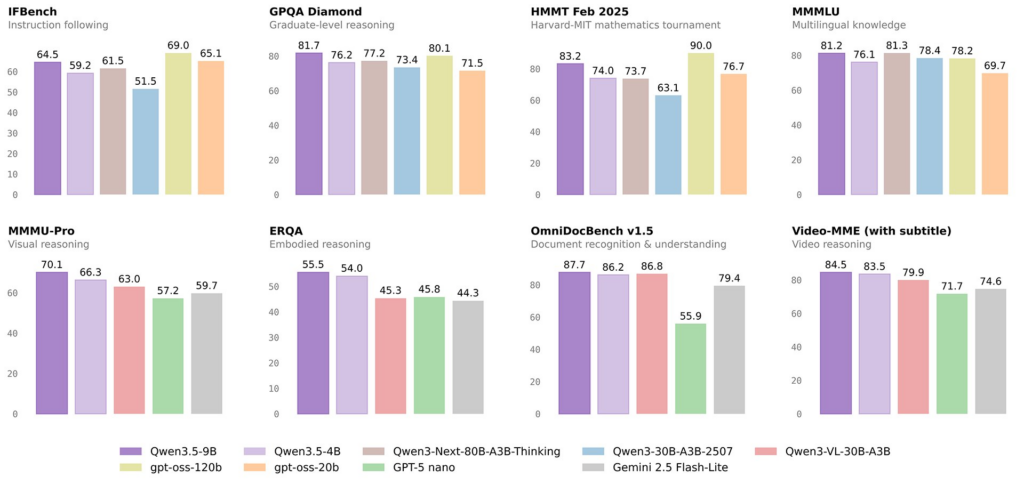
These aren’t shrunken versions of a bigger model. The Qwen 3.5 small series was built from the ground up using the same Gated DeltaNet hybrid architecture behind the 397B flagship: a 3:1 ratio of linear attention to full softmax attention, multi-token prediction, and early-fusion multimodal training on trillions of tokens. We won’t dig deep into the architecture here since plenty of articles already cover that. The result is a family of models that set a new bar for intelligence per parameter.
Why This Matters for Agentic Workflows
The Qwen 3.5 small models aren’t the only notable release of early 2026, but they landed at a moment when they matter most. Over the past couple of years, new models and benchmarks have been dropping weekly with each model slightly better than the last and most people stopped paying attention. But the past few months were different.
One of the biggest shifts was OpenClaw, which pushed the conversation away from chatbots and toward always-on, tool-using agents that people can actually run themselves. OpenClaw, a self-hosted AI agent framework, and OpenCode, an open-source terminal-based coding agent, have each attracted thousands of GitHub stars and together serve millions of developers monthly. Some now describe OpenClaw as the next step in the AI revolution: a self-hosted agent that connects to WhatsApp, Slack, or Telegram, manages calendars, triages inboxes, writes code, and runs automated workflows 24/7, with everything except the model itself running on your own hardware in many setups.
That shift matters because these systems are no longer just “one prompt in, one answer out.” They run continuously, chaining dozens of calls into a single workflow, and that creates the problem the community has been running into: cost and scalability. OpenClaw needs at least 64K tokens of context per prompt cycle to operate effectively as an agent, assembling system instructions, conversation history, tool schemas, skills, and memory into every request. Running frontier cloud models this way gets expensive fast. One developer even described coming back to a $5,000 bill after leaving cloud-based agents running unsupervised for only a few hours.
This is where the economics start to matter. If every step in an agent loop runs on a frontier API model, costs rise quickly, especially for workflows that stay active all day, maintain long histories, or repeatedly call tools. Fully self-hosting everything on a large local model introduces a different set of tradeoffs around VRAM, throughput, concurrency and scalability.
As a result, more teams are moving toward a tiered inference architecture. In this setup, a frontier model handles planning and the highest-stakes decisions, a mid-tier model takes on heavier coding and reasoning work, and a small, fast, low-cost model handles the constant background operations that keep agent systems running. Tasks like summarization, transcript processing, classification, data organization, context management, and tool-call preparation often account for 70% or more of total token usage in a typical agentic workflow. Moving those steps to a 4B or 9B model instead of a frontier API can reduce costs by an order of magnitude with minimal impact on output quality.
This is where the Qwen 3.5 small models become especially compelling. They are not meant to replace frontier models across the board, but they can now cover far more than we usually expect from a “small” model. Beyond lightweight agent tasks, they are increasingly capable in coding, reasoning, and math as well. They still will not outperform the strongest frontier models on every benchmark, but they do not need to. In narrower, well-scoped workflows, a smaller specialized model can be the better tool for the job. That is what makes this release so well timed: the Qwen 3.5 small series is not just efficient – it is capable enough to handle a meaningful share of real-world agent work.
The Mac Mini Question
This shift toward local inference has started a hardware gold rush. Developers are spending $600 to $1,200+ on Mac Minis to run models locally via Ollama, LM Studio, and other inference servers. It is an appealing setup: you can run agents privately, keep them online 24/7, and avoid paying high API costs to external LLM providers.
But the idea comes with another set of questions. Do you really want to buy hardware just to run agents? What happens if a new model comes out next month and that machine suddenly feels outdated or unnecessary? And what if your workload grows? Are you going to buy more boxes and slowly turn your home or office into a mini datacenter? The more practical question is this: for the price of a single Mac Mini, how long could you run the same models in the cloud instead?
That is exactly what we set out to answer. We deployed several Qwen 3.5 variants on SaladCloud and ran a series of benchmarks across those small models. We measured latency, throughput, time per task, and price per token to understand how fast these models run and how much useful work they can deliver for the money.
The answer is that at SaladCloud pricing, you can run Qwen 3.5 models continuously, 24/7, for months for the cost of a single Mac Mini. And unlike a Mac Mini sitting on your desk, SaladCloud gives you elastic scaling, no hardware maintenance, no upfront expenses, and the ability to scale usage up or down based on your needs.
In this post, we will walk through benchmark results, real performance numbers, cost breakdowns, and practical guidance on how these models fit into agentic workflows using tools like OpenClaw, Claude Code, and more. Whether you are a solo developer running a swarm of agents or a team trying to offload high-volume inference from an expensive frontier-model budget, the data points in the same direction.
Deploying the Models on SaladCloud
SaladCloud maintains ready-to-deploy recipes for several of the most widely used LLM inference servers, including Ollama, vLLM, TGI (Text Generation Inference), and llama.cpp. Each recipe exposes an OpenAI-compatible /v1/chat/completions endpoint, which standardizes how downstream tools interact with the model regardless of which server is running underneath. If you want a full walkthrough for using SaladCloud-hosted LLMs with OpenClaw, see this guide.
The deployment process is straightforward. SaladCloud currently offers GPUs with up to 32GB of VRAM (RTX 5090 at the high end). For most models and their versions you can check VRAM requirement on its Hugging Face model card – most list the memory requirement for each quantization level, making it simple to determine which models fit on available hardware. All of the Qwen 3.5 small variants (0.6B, 0.8B, 2B, 4B, and 9B) run comfortably within SaladCloud’s GPU range, even at higher precision. The 27B Unsloth-quantized variant also fits on a 24GB card.
For each model in our benchmark, the steps were:
- Select an inference server recipe in the SaladCloud portal (Ollama, vLLM, or llama.cpp depending on the test configuration).
- Configure the model name, GPU tier, and replica count.
- Wait for node allocation – SaladCloud finds qualified nodes, downloads the container image and model weights, and reports readiness with a green status mark.
- Verify the endpoint is live using the
curlcommand provided on the recipe page, which sends a test chat completion request to the deployed URL.
Once each endpoint responded correctly, we had a working inference API at a SaladCloud URL (e.g., https://vegetable-words-xxxx.salad.cloud) ready for benchmark traffic.
The specific configurations we tried to run:
| Model | Inference Server | Notes |
|---|---|---|
| Qwen 3.5 9B | Ollama | Q4_K_M quantization (Ollama default) |
| Qwen 3.5 4B | Ollama | Q4_K_M quantization |
| Qwen 3.5 2B | Ollama | Q4_K_M quantization |
| Qwen 3.5 4B | vLLM | FP16 precision; instruct variant required for fair comparison |
| Qwen 3.5 9B | llama.cpp | GGUF format |
| Qwen 3.5 27B (Unsloth) | llama.cpp | 4-bit quantization, fits 24GB VRAM |
A Note on Ollama’s Silent Quantization
One detail worth calling out, because it caused us real confusion early on: Ollama applies Q4_K_M quantization by default. This is documented in the model description if you look for it, but it’s not reflected in the model name, the main model card page, or the pull command. When you run ollama pull qwen3.5:9b, what you get is a 4-bit quantized version not the full BF16 model. More importantly, the benchmark scores displayed on Ollama’s model cards are the official numbers from the full-precision model. It is not specified on the page that these scores weren’t produced with the quantized variant you’re actually downloading.
When we ran our first benchmarks on the Ollama deployments and compared the results to the numbers on the model card, there was a gap. It took some investigation to determine that the discrepancy wasn’t a configuration error or a deployment issue on our end it was simply that we were evaluating a Q4_K_M model against full-precision reference scores. Once we understood this, the results made sense, but the initial mismatch was a source of unnecessary debugging.
vLLM, by contrast, runs at FP16 by default. That means direct benchmark comparisons between Ollama and vLLM deployments of the same model size aren’t apples-to-apples since the vLLM variant retains more precision and will generally score higher on accuracy benchmarks. If you run the same weights with the same precision, quantization, and decoding settings, you should expect the same accuracy. What changes across servers and hardware is performance: latency, throughput, memory efficiency, concurrency, startup time, and format support. When scores differ, the reason is usually not the server itself, but differences in the model variant actually being served.
Benchmark Setup
Evaluation Framework
We used lm-evaluation-harness (EleutherAI) as our primary evaluation framework. It provides a standardized interface for running LLM benchmarks against OpenAI-compatible endpoints via its local-chat-completions backend, which made it a natural fit for remote deployments on SaladCloud.
What We Actually Ran
Not every benchmark in lm-eval works with a chat completions endpoint. Many classic benchmarks including HellaSwag, ARC-Challenge, TriviaQA, and standard MMLU rely on loglikelihood scoring, which requires token-level probability outputs that chat APIs do not expose. In practice, these tasks fail with a NotImplementedError, sometimes only after hours of generation.
After testing multiple datasets we focused on two benchmarks that work reliably with OpenAI-compatible chat endpoints: GSM8K–CoT for math reasoning and IFEval for instruction following. That gave us two strong signals that matter for real-world agentic workloads: whether the model can follow directions consistently, and whether it can reason its way through structured multi-step problems.
We did not try to force a larger benchmark suite simply for the sake of having more rows in a table. Qwen 3.5 already comes with extensive official benchmark coverage across language, vision, coding, and agentic tasks. Our goal was to measure how these models behave when deployed the way many developers would actually run them today. Those two benchmarks gave us enough to check capability and deployment quality, while also producing enough requests to calculate meaningful average performance metrics such as throughput, latency, token usage, and calculate cost per request. In other words, even with only two primary datasets, we still generated a benchmark workload large enough to evaluate not just accuracy, but real operating characteristics.
There was also a technical reason to keep the set narrow. Different models and inference servers return outputs in different formats, especially when thinking mode is involved. Some place reasoning in a separate field, some inline it, and some wrap it in custom tags. That makes it difficult to adapt a benchmarking tool across every model and endpoint style without writing model-specific parsing logic.
What We Had to Do to Make It Work
Out of the box, lm-eval does not work cleanly with remote Ollama or vLLM endpoints. We had to solve several issues before the runs were usable.
Context window defaults. Ollama defaults to a 2048-token context window regardless of the model’s actual capacity. Qwen 3.5 supports up to 262K tokens natively, so longer benchmark prompts were being silently truncated. We had to force a larger num_ctx in every request.
lm-eval’s internal max length cap. lm-eval also caps context at 2048 tokens unless overridden. We fixed this by passing max_length in model_args.
lm-eval’s hardcoded max_tokens=256. By default, lm-eval limits each request to 256 output tokens. For chain-of-thought tasks, that is far too short and cuts the model off before it reaches an answer. We solved this by forcing max_tokens at the proxy layer.
Thinking-mode response formatting. Qwen 3.5 models run in thinking mode by default, but different inference servers expose that thinking content differently. Ollama places it in a separate reasoning field and may leave content empty. vLLM includes it inline inside <think>...</think> tags before the final answer. Neither format matches what lm-eval expects to score.
The Proxy
Rather than patching lm-eval directly, we placed a lightweight Flask proxy between lm-eval and the deployed model endpoints. All benchmark requests hit localhost, the proxy normalized both the request and the response, and then forwarded traffic to the actual SaladCloud endpoint.
This solved the compatibility issues above and gave us one more useful benefit: per-request logging of latency and token usage to CSV. That data became the basis for the cost and performance analysis that follows.
Results: Qwen 3.5 9B on Ollama
This is the configuration many developers will try first: the largest of the small models, deployed through Ollama, which appeared to default to Q4_K_M quantization. We ran full benchmark suites for GSM8K-CoT (1,319 samples) and IFEval (541 samples) against a single SaladCloud endpoint.
Accuracy
| Benchmark | Metric | Our Score (Q4_K_M) | Official Score (BF16) |
|---|---|---|---|
| GSM8K-CoT | exact_match (strict) | 82.8% | — |
| GSM8K-CoT | exact_match (flexible) | 80.1% | — |
| IFEval | inst_level_strict_acc | 89.2% | 91.5% |
| IFEval | inst_level_loose_acc | 90.9% | — |
| IFEval | prompt_level_strict_acc | 85.6% | — |
| IFEval | prompt_level_loose_acc | 87.6% | — |
The IFEval results are especially strong. Our Q4_K_M deployment scored 89.2% on instruction-level strict accuracy, only 2.3 points below the official BF16 score of 91.5%. That is a relatively small quantization penalty for a 4-bit model, and 89.2% remains competitive with much larger models.
Qwen does not publish an official GSM8K-CoT score for the 9B model, so there is no direct apples-to-apples comparison here. Still, 82.8% strict-match on 8-shot chain-of-thought math reasoning is a strong result for a quantized 9B model.
The gap between strict-match and flexible-extract is also interesting. In theory, flexible extraction should help by pulling the numeric answer from a less structured response. In our case, strict-match was actually slightly higher. That suggests the model generally formats its final answers well, while the flexible extractor occasionally misparsed responses shaped by thinking-mode output.
What the Responses Look Like
Here are two examples from the GSM8K run. These show only the final scored output. The proxy stripped the model’s internal thinking content before passing the response to lm-eval, but the full raw generations were much longer.
Correct answer — straightforward arithmetic
Question: Janet’s ducks lay 16 eggs per day. She eats three for breakfast every morning and bakes muffins for her friends every day with four. She sells the remainder at the farmers’ market daily for $2 per fresh duck egg. How much in dollars does she make every day at the farmers’ market?
Model response: Janet’s ducks lay 16 eggs per day. She eats 3 for breakfast and uses 4 for muffins, so she uses 7 eggs in total. She has 9 eggs left to sell. Each egg sells for $2. So she makes 18 dollars. The answer is 18.
Correct answer: 18
This is representative of most GSM8K successes: clear reasoning, correct arithmetic, correct formatting.
Incorrect answer — semantic off-by-one error
Question: Carlos is planting a lemon tree. The tree will cost $90 to plant. Each year it will grow 7 lemons, which he can sell for $1.5 each. It costs $3 a year to water and feed the tree. How many years will it take before he starts earning money on the lemon tree?
Model response: Carlos spent $90 to plant the tree. Each year he earns 7 × 1.5 = $10.5 and spends $3 on maintenance, so his net profit per year is $7.5. To recover the initial cost, it takes 90 / 7.5 = 12 years. The answer is 12.
Correct answer: 13
The arithmetic is correct, but the semantic interpretation is not. After 12 years, Carlos has only broken even. Year 13 is when he starts making money. This kind of failure is caused by correct math but incorrect interpretation of the question which appears quite often among GSM8K failed tasks.
Throughput and Latency
We logged every request through the proxy during the benchmark run across all 1,860 requests:
| Metric | Value |
|---|---|
| Median tokens/sec (completion) | 93.1 |
| Mean tokens/sec | 84.7 |
| P25 / P75 tokens/sec | 54.1 / 117.9 |
| Median request duration | 28.5 sec |
| Mean request duration | 35.2 sec |
| P95 request duration | 84.6 sec |
| Mean completion tokens per request | 2,725 |
| Mean prompt tokens per request | 630 |
| Total completion tokens generated | 5,067,826 |
| Total prompt tokens processed | 1,171,527 |
| Total wall-clock time | ~6.2 hours |
A median throughput of 93.1 tokens/sec is a solid result for a Q4_K_M model running through Ollama on a single GPU. The spread between P25 and P75 reflects the mix of tasks: short completions finish quickly, while chain-of-thought prompts spend much longer generating reasoning before producing a final answer.
The mean completion length of 2,725 tokens per request is high relative to the visible answer. That is the cost of thinking mode. In per token pricing schemas it matters a lot more then on SaladCloud: thinking mode can easily double or triple token consumption.
Cost: SaladCloud vs. Mac Mini
We initially ran this benchmark on a single RTX 5090 node at $0.25/hour on SaladCloud’s lowest tier. For Qwen 3.5 9B Q4_K_M model that was more GPU than the model actually required. We then reran the same model on an RTX 3090 (24GB, $0.09/hour) to see how a lower-cost card would perform.
The 3090 was slower – median throughput dropped from 93.1 to 70.7 tokens/sec but the lower hourly price still made it better value for this model size.
| RTX 5090 | RTX 3090 | |
|---|---|---|
| SaladCloud hourly rate | $0.25 | $0.09 |
| Daily cost (24/7) | $6.00 | $2.16 |
| Median tokens/sec | 93.1 | 70.7 |
| Completion tokens/hour | ~820K | ~583K |
| Requests/hour (sustained) | ~301 | ~230 |
| Cost per 1M completion tokens | $0.30 | $0.15 |
| Cost per request (avg) | $0.0008 | $0.0004 |
Mac Minis range from $599 for the base 16GB model to $1,199 or more for a 32GB configuration. Many developers buying one specifically for local inference lean toward the higher-memory option, but even the base model can run smaller Qwen variants. Here is what the same money buys on SaladCloud:
| Mac Mini config | Cost | SaladCloud GPU | Days of 24/7 | Completion tokens | Requests |
|---|---|---|---|---|---|
| 16GB (base) | $599 | RTX 3090 | 277 days (9.2 months) | 3.9 billion | 1.5 million |
| 16GB (base) | $599 | RTX 5090 | 100 days (3.3 months) | 2.0 billion | 0.7 million |
| 32GB | $1,199 | RTX 3090 | 555 days (18.5 months) | 7.8 billion | 3.1 million |
| 32GB | $1,199 | RTX 5090 | 200 days (6.7 months) | 3.9 billion | 1.4 million |
The standout number is simple: for the price of a 32GB Mac Mini, you get more than 18 months of continuous 24/7 inference on an RTX 3090, generating 7.8 billion tokens across 3.1 million requests. Even the base $599 Mac Mini buys more than 9 months of cloud inference on the same GPU. And that comparison assumes the Mac Mini is actually being used for local inference around the clock for months at a time, which is unlikely for most people.
At $0.15 per million completion tokens on an RTX 3090, the cost also compares favorably with hosted APIs. You still give up some advantages of local hardware – near-zero marginal cost after purchase, full local privacy, and no recurring bill but you gain no upfront capital expense, elastic scaling, no maintenance, and the freedom to change GPUs or models without buying new hardware.
For someone running agents continuously for years, local hardware will eventually win on raw cost. For a team validating a use case, handling variable demand, or avoiding a hardware commitment, 9 to 18 months of cloud inference for the same money is a compelling trade.
Results: Qwen 3.5 4B on Ollama
The 4B is arguably the most interesting model in the Qwen 3.5 small series for agentic workloads. It fits on a wide range of modern GPUs but what makes it stand out is its capability relative to size: the official benchmarks show the 4B matching the performance of last-generation Qwen3-VL-30B-A3B (a model with nearly 8x the parameters) on visual agent tasks like ScreenSpot Pro, and outperforming some mainstream models on tool invocation benchmarks like TIRE-Bench. On IFEval, the full-precision 4B scores 89.8% which is higher than GPT-OSS-120B (88.9%), a model 30x its size. This positions the 4B as a serious candidate for the “workhorse” tier of a multi-model agent stack: handling routine summarization, classification, data extraction, context management, and simple tool calls at minimal compute cost.
We ran this model on SaladCloud with Ollama’s default Q4_K_M quantization across two GPU tiers – the RTX 4090 ($0.16/hour) and RTX 3090 ($0.09/hour). The evaluation included GSM8K-CoT, IFEval.
Accuracy
| Benchmark | Metric | Our Score (Q4_K_M, 100 samples) | Official Score (BF16) |
|---|---|---|---|
| GSM8K-CoT | exact_match (strict) | 73.0% | — |
| GSM8K-CoT | exact_match (flexible) | 73.0% | — |
| IFEval | inst_level_strict_acc | 84.0% | 89.8% |
| IFEval | inst_level_loose_acc | 85.3% | — |
| IFEval | prompt_level_strict_acc | 77.0% | — |
| IFEval | prompt_level_loose_acc | 78.0% | — |
The IFEval result of 84.0% instruction-level strict accuracy is 5.8 points below the official BF16 score of 89.8%. This is a larger quantization penalty than the 9B model experienced (2.3 points), which is consistent with what the community reported: smaller models are more sensitive to 4-bit quantization. That said, 84% is still a strong result and is higher than many full-precision models from the previous generation.
The GSM8K-CoT score of 73.0% is lower than the 9B’s 82.8%, as expected. With 100 samples we tested on, the confidence interval is wider (±4.5%), so the true score likely falls in the 68–78% range. For the tasks the 4B is best suited for such as classification, summarization, structured extraction, tool calling GSM8K math reasoning is not the primary use case.
We also tested the HumanEval but it scored 0.0%, which is a tooling issue, not a model failure. The model generated correct-looking code in its responses, but the thinking mode output format confused lm-eval’s code extraction logic. The model’s response to HumanEval prompts included reasoning about the approach before writing code, and the extraction harness could not reliably separate the solution from the reasoning.
Throughput
The proxy logged 2,730 total requests across the RTX 4090 benchmark run and 1,023 on the RTX 3090.
| Metric | RTX 4090 | RTX 3090 |
|---|---|---|
| Median tokens/sec | 128.3 | 76.4 |
| Mean tokens/sec | 122.7 | 73.0 |
| P25 / P75 tokens/sec | 113.4 / 133.1 | 63.0 / 89.6 |
| Mean completion tokens/request | 2,654 | 2,930 |
The 4B runs at 128.3 tokens/sec median on the RTX 4090 is significantly faster than the 9B on the RTX 5090 (93.1 tok/s), which is expected given the 4B’s smaller size. The RTX 3090 delivers 76.4 tok/s on the same model, roughly 60% of the 4090’s throughput, reflecting the memory bandwidth difference between the two cards.
Cost
The 4B model is small enough to run on a wide range of GPUs. At Q4_K_M quantization fits on anything from an RTX 3060 (12GB) upward. The cost picture improves significantly as you move to cheaper hardware:
| GPU | SaladCloud $/hr | Median tok/s | Cost per 1M completion tokens | $599 Mac Mini equivalent | $1,199 Mac Mini equivalent |
|---|---|---|---|---|---|
| RTX 4090 | $0.16 | 128.3 | $0.35 | 156 days (5.2 months) | 312 days (10.4 months) |
| RTX 3090 | $0.09 | 76.4 | $0.33 | 277 days (9.2 months) | 555 days (18.5 months) |
On the RTX 4090 at $0.16/hour, the cost comes to $0.35 per million completion tokens. On the RTX 3090 at $0.09/hour, it’s $0.33 nearly the same per-token cost because the lower hourly rate is offset by lower throughput. The price of a base Mac Mini buys over 9 months of continuous operation on the 3090, while the 32GB Mac Mini equivalent stretches to over 18 months. For a model designed to handle the high-volume, low-complexity tasks in an agent stack, these economics are difficult to beat.
A Note on Qwen 3.5 2B
We evaluated the 2B model briefly but decided not to run full benchmarks on SaladCloud. The 2B is designed primarily for edge deployment such as phones, tablets, IoT devices where the constraints are power consumption and memory, not cloud GPU cost. At Q4 quantization, it runs on hardware far below what SaladCloud’s GPU nodes provide, and its benchmark scores (scoring 16 on the Artificial Analysis Intelligence Index, on par with the 7B-class Falcon-H1R) reflect the tradeoffs of that size class. For cloud-based agentic workloads, the 4B is the better starting point.
Results: Qwen 3.5 4B on vLLM (Full Precision)
The Ollama results above reflect a Q4_K_M quantized model — useful for understanding what most developers will deploy in practice, but not a fair comparison to the official benchmarks. To validate how much accuracy the quantization costs, we also ran the Qwen 3.5 4B Base model on vLLM at FP16 precision. This is the same weight format used for the official benchmark numbers on the model card.
We ran evaluations on GSM8K-CoT and IFEval to compare directly against the Ollama results.
Accuracy
| Benchmark | Metric | vLLM FP16 | Ollama Q4_K_M |
|---|---|---|---|
| GSM8K-CoT | exact_match (flexible) | 94.0% | 73.0% |
| IFEval | inst_level_strict_acc | 88.6% | 84.0% |
| IFEval | prompt_level_strict_acc | 79.0% | 77.0% |
The GSM8K results tell an important story. The flexible-extract score of 94.0% is excellent – this confirms that the full-precision model gets the right answer on nearly all math problems. We got 42% strict-match score which is not a reasoning failure, but a formatting issue. The Base model doesn’t consistently format its answers the way the strict matcher expects. For example, on a question about egg sales, the model answered “$18” instead of “18” which is a correct answer, but counts as a wrong format for the scoring harness. The flexible extractor handles this gracefully.
This 94% flexible-extract score is consistent with what we’d expect from the official benchmarks. It validates that the Qwen 3.5 4B at full precision performs at or near the level Alibaba reports and the gap we saw in the Ollama runs is primarily a quantization effect, not a model limitation.
Throughput
The throughput number between Ollama and vLLM are almost the same, even though vLLM was serving a more accurate version of the model
| Metric | vLLM (FP16) | Ollama (Q4_K_M) |
|---|---|---|
| Median tokens/sec (substantial) | 129.8 | 128.3 |
| Mean tokens/sec (substantial) | 125.4 | 122.7 |
For production deployments where throughput and quality matters, vLLM is the better choice. For quick evaluation and development, Ollama’s simplicity is hard to beat.
Qwen 3.5 27B and 35B on SaladCloud
In addition to the small models covered above, we successfully deployed the Qwen 3.5 27B and Qwen 3.5 35B-A3B on SaladCloud. Both run as quantized variants – the 27B fits on a 24GB GPU at 4-bit quantization, and the 35B-A3B’s architecture activates only 3B parameters per forward pass, making it surprisingly efficient despite its total parameter count.
Early testing shows both models perform well on coding tasks, with the 27B in particular gaining attention in the community as a strong base for distilled reasoning models. Running full benchmarks on these larger models requires updating our benchmarking tooling to handle their longer generation patterns and higher memory requirements which we are currently working on. We’ll be publishing quick-deploy recipes for both models on the SaladCloud portal shortly, along with latency and pricing data.
Conclusion
We set out to answer a simple question: can you run Qwen 3.5 small models on SaladCloud as a practical alternative to buying dedicated hardware or using expensive LLM API’s? The data says yes and the economics are more favorable than we initially expected.
Here’s a summary of what we found across all configurations tested:
| Model | Server | GPU | IFEval strict | Median tok/s | $/1M tokens | $599 Mac Mini buys | $1,199 Mac Mini buys |
|---|---|---|---|---|---|---|---|
| Qwen 3.5 9B (Q4_K_M) | Ollama | RTX 5090 ($0.25/hr) | 89.2% | 93.1 | $0.30 | 3.3 months | 6.7 months |
| Qwen 3.5 9B (Q4_K_M) | Ollama | RTX 3090 ($0.09/hr) | same weights | 70.7 | $0.15 | 9.2 months | 18.5 months |
| Qwen 3.5 4B (Q4_K_M) | Ollama | RTX 4090 ($0.16/hr) | 84.0% | 128.3 | $0.35 | 5.2 months | 10.4 months |
| Qwen 3.5 4B (Q4_K_M) | Ollama | RTX 3090 ($0.09/hr) | same weights | 76.4 | $0.33 | 9.2 months | 18.5 months |
| Qwen 3.5 4B (FP16 Base) | vLLM | RTX 4090 ($0.16/hr) | 88.6% | 129.8 | $0.34 | 5.2 months | 0 |
For the cost of a base Mac Mini ($599), you get 5 to 10 months of continuous cloud inference depending on model and GPU choice. For the price of a 32GB Mac Mini ($1,199), you get 10 to 20 months. During that time, you generate billions of tokens across millions of requests – more than enough to validate a use case, run an agent stack through its early lifecycle, or handle production workloads for a team that doesn’t need hardware running 24/7 indefinitely.
It’s also worth noting that SaladCloud’s pricing is based on compute hours, not tokens. You pay for the GPU time, and however many tokens you can push through it are yours. To put that in perspective: at $0.15 per million tokens on an RTX 3090, you’re paying over 150x less than Claude Opus ($25/M output tokens) for every token generated. Of course, a 9B model isn’t replacing Opus for complex reasoning but for the general routine or coding tasks it is good enough. That means the per-token costs in the table above also aren’t fixed. If a faster inference server comes along, or a future model architecture generates tokens more efficiently on the same hardware, your effective cost per token drops automatically without any pricing change on SaladCloud’s side. You’re renting the GPU, not buying tokens.
A few broader takeaways from the benchmarking process:
Quantization matters but so does knowing what you’re running. The same model weights will always produce the same accuracy, regardless of inference server or GPU. If you want to reproduce the scores you see on an official model card, you need to make sure you’re actually running the same weights. This can be trickier than it sounds- if you pull a model from a non-official source or use a tool that applies quantization by default, you might be running a different set of weights without realizing it. Do your research before drawing conclusions from benchmark comparisons. That said, as our results showed, quantized models aren’t dramatically worse overall – the 9B lost 2.3 points on IFEval at Q4_K_M, and even the more sensitive 4B remained strong and they’re significantly easier to run on consumer hardware. Only testing on your specific tasks can tell you whether full precision is worth the extra overhead.
Thinking mode is a hidden cost multiplier. Qwen 3.5 models default to thinking mode, which generates internal reasoning before the visible answer. Our 9B benchmark averaged 2,725 completion tokens per request – the majority of which was thinking content stripped by the proxy before scoring. In reality this means your token budget is 2–3x what the visible output suggests and you either need to count that or use a pricing model that is not token based.
These models are a new reality. The Qwen 3.5 9B at 89.2% IFEval (quantized) and the 4B at 94% GSM8K (full precision) aren’t demo-quality curiosities. They are production-capable models that can handle the routine inference tasks that consume the bulk of an agentic workflow’s token budget at a fraction of the cost of frontier APIs. Whether you run them on SaladCloud, a Mac Mini, or any other infrastructure, the underlying capability is there.
The recipes for all models tested in this post are available on the SaladCloud portal. Recipes for the Qwen 3.5 27B and 35B-A3B will be published shortly.