SaladCloud is powered by tens of thousands of globally distributed nodes—primarily high-performance desktop computers and servers running the SaladCloud agent. Each node is equipped with consumer-grade or data center GPUs, along with diverse CPU and memory configurations. Node distribution varies by region: consumer GPU nodes in North America make up 50–60% of the total, while nearly all data center GPU nodes are currently located in the US.
Because of the distributed architecture, nodes can differ significantly in network throughput, startup time, and uptime—all critical factors to consider when designing applications for SaladCloud. In this benchmark, we deployed a workload with 100 replicas over seven days to measure key metrics such as startup times, interruptions and reallocations, uptimes, run-to-request radio and performances. These results provide practical reference points for building high-performance, reliable applications on SaladCloud.
Benchmark Methodology
The test workload, packaged as a 5.53 GB (compressed) image, is integrated with the GPU-intensive lolMiner. During execution, it collects key metrics every minute, including mining performance (solutions/s), resource utilization (CPU, RAM, GPU, VRAM), and GPU temperature. Aggregated metrics are saved to the cloud every 5 minutes, with approximately 2.5 minutes of data lost during each reallocation. Please refer to the test code for more details.
We executed the workload by deploying a container group with 100 replicas, each provisioned with 8 vCPUs, 16 GB of memory, and all available consumer GPU types at high priority. The group ran continuously for 7 days and 2 hours, during which each instance generated a metric file that was stored in the designated bucket and folder in Cloudflare R2. We then downloaded and analyzed these files to produce the key metrics.
It is important to note that outcomes can vary depending on factors such as image size, replica count, selected regions and resource types, workload priority, and test duration. Consequently, results may differ under different circumstances.
Startup Times
Startup time includes instance allocation, image download, and decompression, and is influenced by several factors:
-
Node availability within SaladCloud
-
Download throughput between nodes and SaladCloud's internal caches in the EU and US, which depends on image size, geographic distance, network latency, and bandwidth
-
Cache performance under concurrent transfers
-
Decompression time, determined by image size, CPU performance, and disk I/O on the nodes
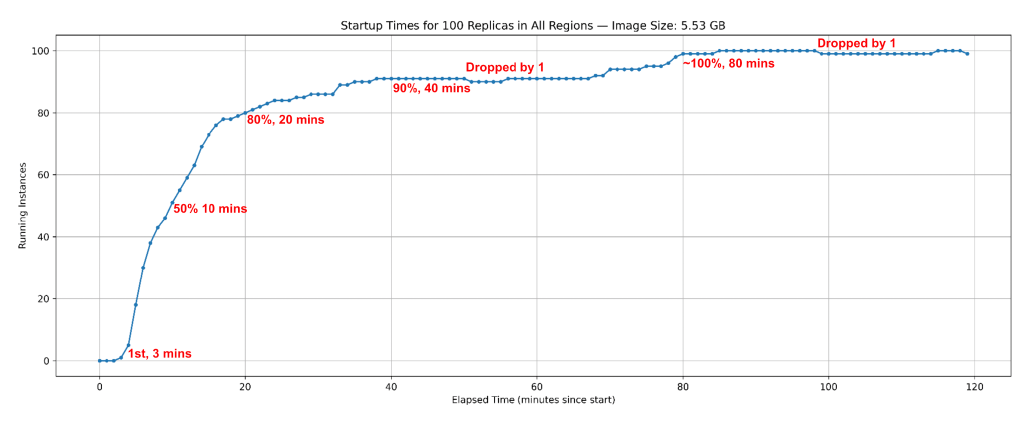
Starting at 00:00 UTC on September 22, 2025, we tracked how many instances became operational over time to measure startup times. Key observations include:
-
Instances began coming online and reporting results within 3 minutes of the test start.
-
50% of instances were online by 10 minutes, 80% by 20 minutes, and 90% by 40 minutes.
-
The count briefly dropped by one, indicating a reallocation event.
-
By around 80 minutes, nearly all 100 instances were online, with minor fluctuations afterward due to further reallocations.
Interruptions and Reallocations
Running instances may go offline for various reasons, in which case new instances are allocated to continue processing:
-
Voluntary Interruptions: Node providers may temporarily reclaim their resources for their own use, pausing sharing. However, high-priority, high-paying workloads that run reliably over long periods generate greater earnings, giving providers less incentive to interrupt.
-
External Interruptions: Factors such as power outages, network issues, or hardware failures can also take nodes offline.
-
Proactive Reallocations: During periods of high demand, SaladCloud may reassign resources from lower-priority workloads to higher-priority ones. Applications can also trigger reallocation via IMDS Reallocate API if current instances fail to meet requirements.
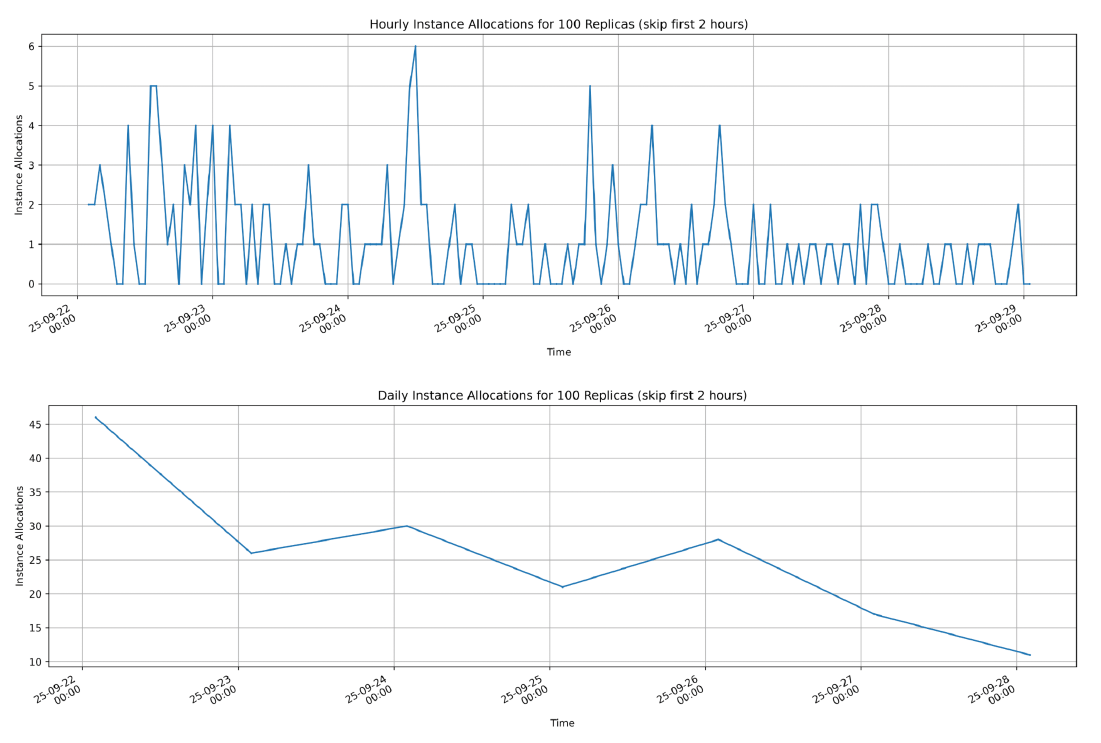
We skipped the first 2 hours of startup, allowing initial allocations to complete. We then monitored how many new instances became operational over time to assess interruptions and reallocations. Key observations are:
-
Maximum hourly reallocations: 6
-
Average hourly reallocations over the 7-day period: 1.1
-
Reallocations decreased over time, falling from more than 45 per day to fewer than 15 per day, with occasional fluctuations. This trend indicates that the longer an application runs, the lower its likelihood of interruption.
SaladCloud's data center nodes can reliably run high-priority workloads without interruptions from their providers.
Uptimes
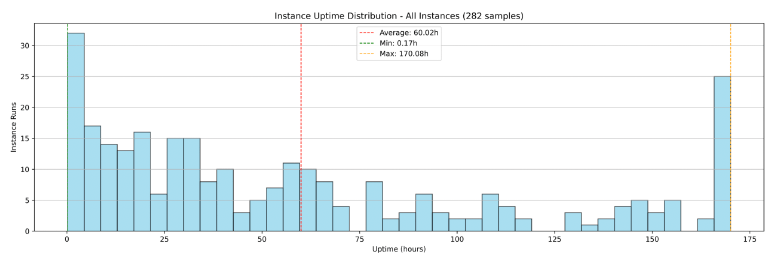
Uptime is mainly influenced by interruptions, reallocations, and startup delays. By recording when each instance first came online and its last update, we can calculate the effective uptime. Key observations are:
-
100 instances running over 7 days generated 282 samples (instance runs). Before the container group was shut down, 182 instance runs had already completed (interrupted) while 100 instances were still running.
-
25 instances ran uninterrupted for a full 7-day period.
-
The average uptime across all instance runs (interrupted and uninterrupted) was 60 hours.
-
The average uptime of completed instance runs (interrupted) was 35 hours.
High-priority applications on SaladCloud's data center nodes generally run uninterrupted for extended periods.
Run-to-Request Ratio
The instance run-to-request ratio measures the actual compute capacity available compared to what is requested. For example, when requesting 100 instances, the ratio indicates how many are running at any given time. When a node goes offline and a replacement is allocated, additional time is required to download and decompress the image before the new instance
becomes operational. Because of variations in startup times and uptimes, a 100% run-to-request ratio cannot be consistently guaranteed on SaladCloud's consumer GPU nodes.
Large image sizes can increase startup times, which in turn lowers the run-to-request ratio. To mitigate this, it is often necessary to provision additional instances (5~10%) beyond the initial plan, particularly for real-time inference workloads.
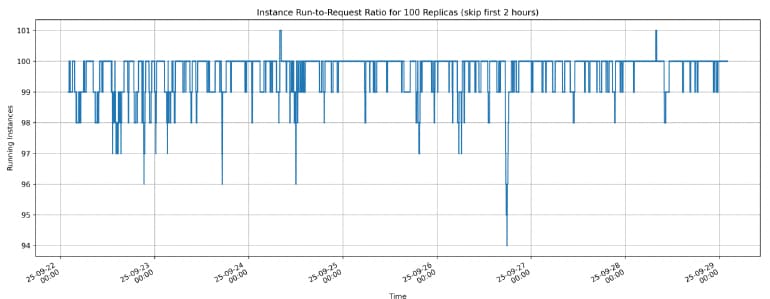
By tracking the number of running instances over time, we can calculate the run-to-request ratio. Key observations include:
-
Average instance run-to-request ratio: more than 99%
-
Lowest instance run-to-request ratio: 94%
-
The instance run-to-request ratio can temporarily exceed 100% from the application's perspective. When nodes lose connection to SaladCloud (not charged in this case), applications may continue running briefly before the nodes are fully shut down. During this period, as new nodes are allocated and start running, the number of running instances can temporarily exceed the original request.
Processing Performance
On SaladCloud, nodes with the same consumer GPU type can exhibit varying performance due to differences in system configuration (CPU, RAM), clock speed, cooling, and power limits. For a single node, its performance may fluctuate over time as a result of temperature changes and cooling efficiency.
Based on the test, over 90% of SaladCloud's consumer nodes deliver stable and consistent performance, and all data center nodes do so. The following instance run illustrates stable performance (black line) and resource usage over the 7-day execution period:
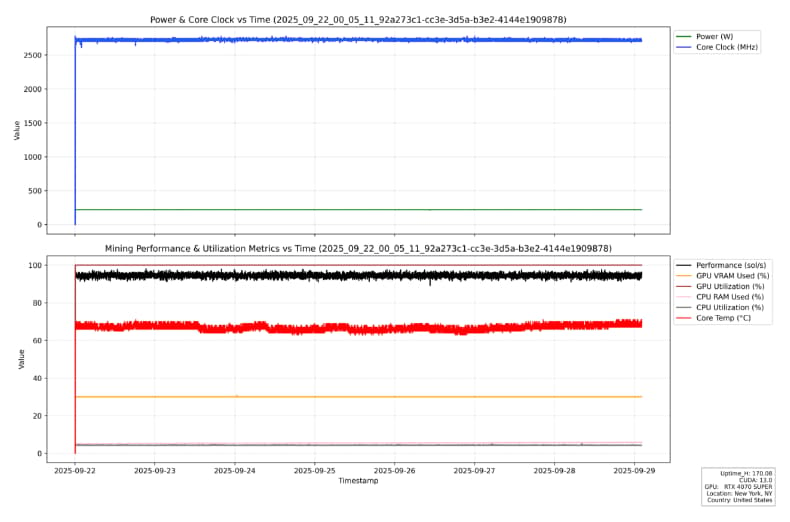
To manage performance variances and fluctuations from a small number of consumer GPU nodes, we recommend conducting an initial check and real-time performance monitoring to select suitable nodes and ensure they remain in an optimal state for application execution.
Build High-Performance, Reliable Applications on SaladCloud
The benchmark test offers insights into the distributed nature of SaladCloud and provides reference data for building high-performance, reliable applications. Applications can be optimized to address specific challenges and fully leverage SaladCloud's exceptional flexibility and cost effectiveness, enabling GPU-powered workloads to scale up or down at highly competitive prices. For more details, please refer to this guide.
For workloads that process millions of jobs in a short time or require access to hundreds of GPUs—including multiple types for testing or research—SaladCloud offers an ideal platform.
Deploy a GPU on SaladCloud Today
Interested in running your workload on SaladCloud (H100s, A100s, RTX 4090s, and more)? Check out SaladCloud.